A free AI image editor lets you modify photos and generate visuals without upfront payment, but free tiers in 2026 impose real limits on exports, watermarks, and advanced tools. Photopea offers full layer-based editing with local processing and no account required, Pixlr combines generative fill with a browser editor under a freemium model, and Fotor caps free AI credits at roughly three generated images with watermarked exports .
At-a-Glance Box
- Photopea is the strongest free option for serious editing. Full layer support, PSD compatibility, and local processing without uploading files to a server .
- Pixlr blends generation and editing in one browser tab. Generative fill, background removal, and AI image generation sit alongside conventional editing tools .
- Fotor’s free tier is a demo, not a workspace. Watermarked exports and roughly 10 AI credits limit practical use .
- Google’s Nano Banana is accessible through Playground. Fast, free image editing with character consistency, no sign-up required for basic use .
- Canva’s free AI features are limited. Magic Text and background removal work within monthly caps; full Canva AI requires a paid plan .
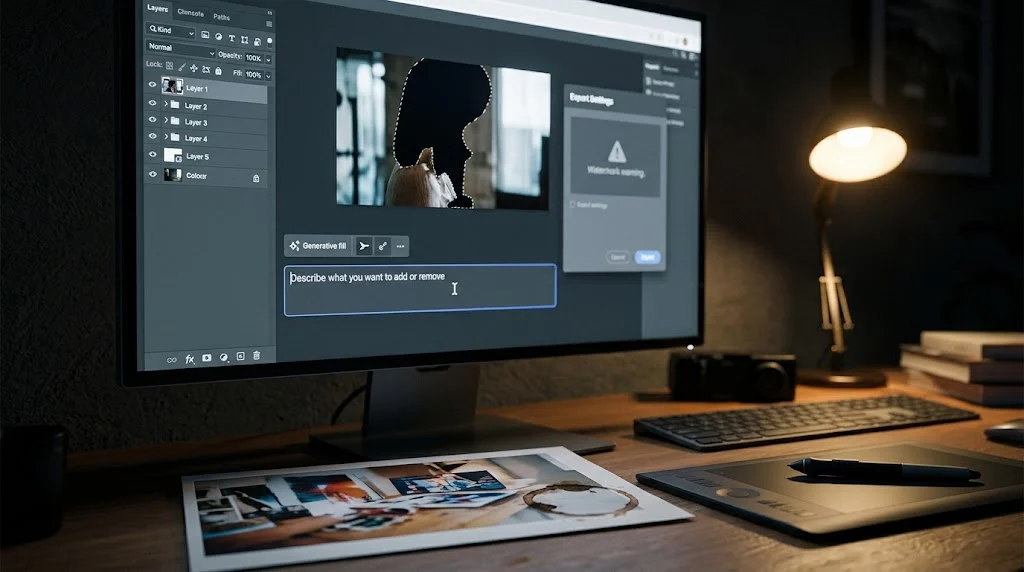
- Watermarks and export restrictions are the hidden cost. Several free editors let you preview results but block clean downloads without payment.
What “Free” Actually Means for AI Image Editors
Searching for a free AI image editor usually starts with a specific need. You want to remove a background, clean up a photo, generate a missing element, or upscale an image without buying Photoshop or committing to a subscription. The results page offers dozens of options, each promising AI-powered editing without explaining what the free tier includes.
The reality is more fragmented than a single product category. Some “free AI image editors” are full editing suites with AI features bolted on. Others are generation tools that accept an uploaded image as a reference. A few are thin wrappers around third-party models, charging credits for access to someone else’s technology.
This guide maps the current landscape as of late October 2026. It separates the tools that offer genuine free editing from the ones that use “free” as a lead-generation funnel. It covers what each platform delivers, where the limits sit, and which tool matches which job.
How Free Tiers Actually Work
The Three Categories
Free AI image editors fall into three rough categories, each with different constraints.
Full editing suites with AI features. Photopea and Pixlr belong here. They offer layer-based editing, masking, and conventional tools alongside AI functions like background removal and generative fill. Free tiers usually work, with limits on advanced features or export quality.
Generation-first tools with editing capability. Google’s Nano Banana, accessed through Playground, falls here. You upload an image and describe the change in text. The tool excels at character consistency and fast iteration, but it is not a conventional editor with layers and masks .
Design platforms with AI assistance. Canva and Fotor sit in this category. They prioritize templates and one-click results over precise editing control. Free tiers are generous for basic use but cap AI features aggressively .
Watermarks and Export Restrictions
The most common free-tier limitation is not the editing itself. It is the export. Fotor’s free plan applies watermarks to exported images and restricts cloud storage . Pixlr’s free browser editor works without watermarks, but premium content and ad-free editing require payment . Canva’s free AI features have monthly usage caps, and full Canva AI access requires a paid plan .
Photopea is the exception. It does not watermark exports and does not require an account. The tradeoff is that it runs entirely in your browser, processing files locally rather than on a server .
Local Processing vs. Cloud Dependency
Photopea’s local processing model deserves specific attention. The editor runs in your browser, and the files never leave your device . That means no upload wait, no server-side retention, and no exposure of sensitive images to a third party. For anyone editing confidential material, client photos, or personal documents, that distinction matters more than any feature comparison.
The tradeoff is performance. Local processing depends on your hardware. Large files and complex operations may run slower than on cloud-accelerated tools. For most editing tasks on a modern machine, the difference is negligible.
Platform-by-Platform Breakdown
| Photopea | Full editor, no account | None | Background removal, generative fill | Serious editing, privacy |
| Pixlr | Browser editor + basic AI | None stated | Generative fill, object removal, upscale | All-in-one generation and editing |
| Fotor | ~10 AI credits, watermarked exports | Yes | Background removal, object removal, AI portraits | Quick one-click edits |
| Playground (Nano Banana) | 10 free generations, no sign-up | None | Conversational editing, character consistency | Fast iteration, reference fusion |
| Canva | Monthly AI caps on free plan | No | Magic Text, background removal | Template-based design |
| Adobe Firefly | Limited free generative credits | Varies | Generative fill, text-to-image | Adobe ecosystem users |
Photopea: The Full Editor That Happens to Be Free
Photopea is the closest thing to a free Photoshop replacement available in a browser. It supports layers, masks, smart objects, layer styles, channels, and vector paths. It opens native PSD files, Illustrator files, Figma files, RAW images from major camera brands, and over 40 other formats .
The AI features are integrated rather than bolted on. One-click background removal and text-prompted content replacement work directly within the editing interface. You select an area, describe what should fill it, and the tool generates the result .
The privacy model is the differentiator. Photopea processes files locally in your browser. Nothing gets uploaded to a server. The creators state that all processing happens on the user’s device . For client work, personal photos, or anything you would not want stored on a third-party server, that is a meaningful advantage.
The limitations are structural. Photopea is a single-developer project, not a venture-funded platform. Some premium features require a subscription or watching an ad. The interface assumes familiarity with Photoshop conventions. Beginners may find the learning curve steeper than Canva or Fotor .
Pixlr: Generation and Editing in One Tab
Pixlr combines a conventional photo editor with AI generation tools in a single browser interface. The free tier includes layer support, masking, batch processing, and AI features like generative fill, background removal, object removal, and upscaling up to 25 megapixels .
The integration is the appeal. You can generate an image from a text prompt, then edit it with conventional tools, all without switching applications. Pixlr integrates models including Flux, Kling, Recraft, Veo, Qwen, and Stable Diffusion, giving users access to multiple generation backends through one interface .
The free tier is usable but constrained. Premium content, advanced tools, and ad-free editing require payment. The free version includes ads and limits access to the full AI model lineup. Plans start at $1.99 monthly, making the paid step relatively affordable if the free tier proves insufficient .
Pixlr does not offer RAW photo support, which matters for photographers working with camera files . For social media content, quick product edits, and AI-assisted design work, the free tier covers a lot of ground.
Fotor: The Watermark Problem
Fotor offers a wide range of AI editing features: background removal, object removal, AI portrait generation, image enhancement, and text-to-image generation. The platform is available as a web app, desktop software for Windows and macOS, and mobile apps for Android and iOS .
The free tier is where the problems start. New users receive roughly 10 credits for AI generation, enough for about three images. Exported images carry watermarks. Cloud storage is limited. Basic templates are available, but premium templates require payment .
For testing whether Fotor’s aesthetic suits your needs, the free tier works as a preview. For actual production work, the watermarked exports make it unusable without upgrading. The Pro plan at $3.99 monthly (billed annually) removes watermarks and includes 1,200 credits per year .
Google’s Nano Banana via Playground: Fast, Free, Conversational
Google’s Gemini 2.5 Flash Image model, marketed as Nano Banana, is accessible through Playground without a sign-up for basic use. The tool specializes in conversational editing: upload an image, describe the change, and the model applies it. Character consistency across edits is a standout feature, making it useful for iterative portrait work and reference-based generation .
The free allowance is 10 generations through Playground, with a separate free tier for Nano Banana Pro at one generation per 30 days . Generation speed is fast, typically three to six seconds for the standard model .
The limitation is scope. Nano Banana is not a full editor. It does not offer layers, masks, or precise selection tools. It is a conversational image transformer, best suited for quick edits, style transfers, and iterative refinement of a single concept. For layered editing, Photopea or Pixlr remain the stronger choices.
Canva and Adobe Firefly: AI Inside a Larger Platform
Canva’s free plan includes limited access to AI features like Magic Text and background removal. Monthly usage caps apply, and full Canva AI access, including conversational design editing, requires Canva Pro or higher . The strength is integration: AI editing happens inside the same interface you use for layout, text, and export. The weakness is that the AI features are designed for template-based design, not precise photo manipulation.
Adobe Firefly’s free tier offers limited generative credits for features like generative fill and text-to-image. The credits reset monthly, and paid plans unlock unlimited standard generation and advanced features . Firefly’s training data provenance is its differentiator, but the free tier is too limited for sustained work.
Privacy and Data Handling
Free AI image editors process your files. Where that processing happens determines your exposure.
Photopea’s local model is the strongest privacy position available among free editors. Files never leave your device . No account is required, meaning no profile ties your edits to an identity.
Cloud-based tools operate differently. Fotor, Pixlr, and Canva upload files to their servers for processing. Their privacy policies govern retention, and free-tier data may be used for model improvement unless you opt out. Playground’s Nano Banana sends uploads to Google’s Gemini API, subject to Google’s data handling terms .
No major free AI image editor publicly commits to Zero Data Retention on free accounts. SOC 2 certification, where present, addresses organizational controls rather than individual file retention. If your images contain sensitive information, local processing is the only reliable safeguard.
Common Mistakes With Free AI Image Editors
Exporting before checking for watermarks. Fotor watermarks free exports. Some Pixlr premium content may carry restrictions. Preview the final file before committing to a tool for a project.
Assuming “AI editor” means precise control. Conversational tools like Nano Banana excel at fast iteration but lack selection tools. Full editors like Photopea require learning an interface. Match the tool to the task.
Ignoring local processing options. Photopea handles files locally, eliminating upload wait and server exposure. For sensitive images, that matters more than any feature list.
Burning free credits on test runs. Fotor’s 10 credits disappear quickly. Pixlr’s free tier includes ads and limited model access. Test with low-stakes images before using a tool for real work.
Expecting RAW support everywhere. Pixlr does not support RAW files . Photopea does . If you shoot in RAW, check compatibility before committing.
Who Should Use a Free AI Image Editor
Photographers and designers needing full control should use Photopea. Layer support, PSD compatibility, and local processing make it the most capable free editor available.
Creators who want generation and editing together should use Pixlr. The integrated AI models and browser-based editor cover most content creation needs without switching tools.
Anyone doing quick one-click edits can use Fotor or Canva, accepting watermarks or usage caps as the cost of simplicity.
Users prioritizing privacy should use Photopea. Local processing means no uploads, no accounts, and no server-side retention.
Developers and tinkerers can explore Playground’s Nano Banana for fast, conversational edits, accepting the 10-generation limit as a constraint.
Latest Developments
Photopea continues to add AI features without compromising its local-processing model, a rare combination in a market moving toward cloud dependency . Pixlr has expanded its model integrations, adding access to Flux, Kling, Recraft, Veo, Qwen, and Stable Diffusion through a single interface .
Google’s Nano Banana, accessed through Playground, represents a new category: conversational editing that prioritizes speed and character consistency over traditional editing controls . Its free tier is limited but functional.
The broader trend is toward tighter free allowances. As inference costs remain significant, platforms face pressure to convert free users into paying customers. The generous free tiers available in 2026 may not persist indefinitely.
Conclusion
Free AI image editors like Photopea, Pixlr, Fotor, and Canva offer different features, from advanced editing to quick AI-powered results. The best choice depends on your needs, privacy preferences, and editing limits.
Before choosing a tool, check for watermarks, usage caps, and how your images are processed. The best free editor is one that delivers the features you need without unexpected restrictions.