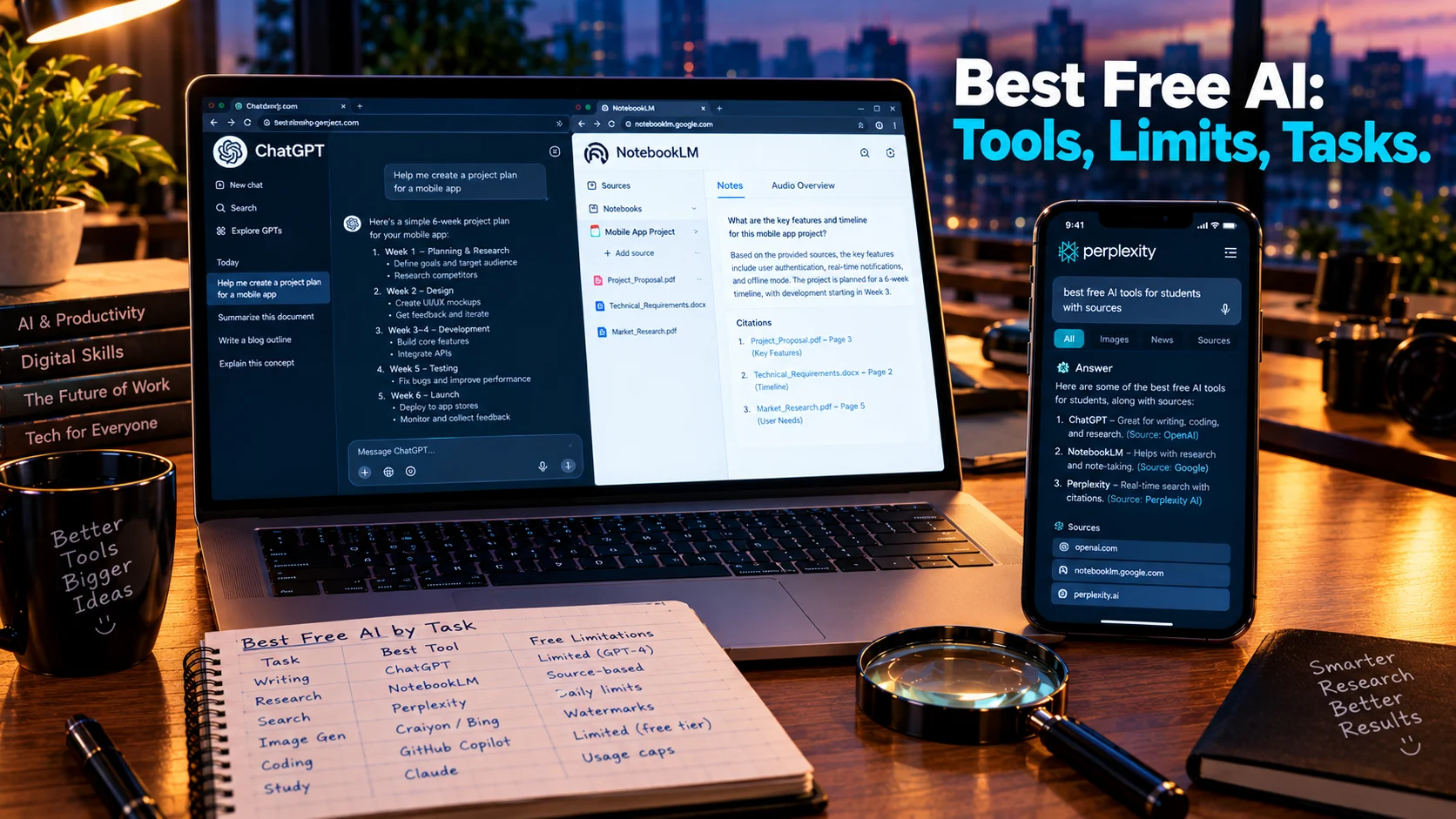
The best free AI tool depends on your task. ChatGPT offers the strongest general-purpose free tier with GPT-5.5, file uploads, and image generation. NotebookLM is the best for grounded document analysis with citations. Perplexity leads for cited research. Claude handles long-form writing. Gemini suits Google Workspace users, and Copilot fits Microsoft ecosystems.
At-a-Glance: Key Takeaways
- ChatGPT remains the strongest general-purpose free AI, with access to GPT-5.5, web search, file and image uploads, data analysis, and image creation. Free users face rate limits and some tools have separate caps .
- NotebookLM is the best free tool for document work, grounding every answer in your uploaded sources with citations. It offers 100 notebooks, 50 sources per notebook, and 50 chats daily on the free tier .
- Perplexity is best for cited research, offering unlimited basic searches with roughly 5 Pro searches daily. Source quality varies and summaries require manual verification .
- Claude excels at long-form writing and document reasoning, with a 200K-token context window on the free tier, though usage limits apply .
- Gemini’s free tier varies by account and region, and its image generation carries a visible watermark plus invisible SynthID marking .
- “Free” never means unlimited. Every tool imposes caps, gates premium features, or restricts commercial use. The best free AI is the one whose limits match your actual workflow.
What Is “Best Free AI”?
“Best free AI” is an intent-driven search. Users want to know which AI tools are genuinely usable without paying, what each does well, and where the limitations become prohibitive. The answer is not a single product but a matrix of tools optimized for different tasks.
The free AI landscape in 2026 is mature enough that no single tool dominates every category. ChatGPT leads general work, NotebookLM leads document analysis, Perplexity leads cited research, and Claude leads long-form writing. The “best” choice depends entirely on what you are trying to accomplish.
The Best Free AI Tools by Task
ChatGPT: The Strongest General-Purpose Free Tier
ChatGPT remains the default starting point for most users. The free tier provides access to GPT-5.5, web search, file and image uploads, data analysis, image creation, GPTs, and limited storage through ChatGPT Library .
What It Does Well
Summarizing meeting notes, drafting emails, cleaning up spreadsheets, analyzing PDFs, brainstorming content ideas, creating first-pass project plans, and generating simple images. The breadth of capabilities means most users can accomplish their work without switching tools .
Where the Limits Hit
Free users face rate limits, and some tools have separate caps. The daily image generation allowance is small, around two to three images per 24 hours according to community reports . Teams should be cautious about entering sensitive company data into personal accounts without organizational approval .
Editorial interpretation: ChatGPT’s free tier is the best single starting point for general work. The limitations become apparent only under heavy daily use or when you need specialized capabilities like grounded document analysis or cited research.
NotebookLM: The Best Free Tool for Documents
NotebookLM is the strongest free AI tool for working with specific source material rather than the open web. Every answer is grounded in your uploaded documents, with citations that let you verify claims .
What It Does Well
Upload up to 50 sources per notebook, including PDFs, web links, and documents. Ask questions, generate summaries, create study guides, and produce Audio Overviews. The source-grounded approach dramatically reduces hallucination risk compared to general chatbots .
Where the Limits Hit
Sources must be uploaded. NotebookLM will not crawl the web for you. Some outputs, including videos and mind maps, are less transparent about their exact sources . The free tier offers 100 notebooks, 50 sources per notebook (up to 500K words each), 50 chats daily, and 3 Audio Overviews daily .
Editorial interpretation: For consultants, analysts, researchers, and anyone synthesizing long documents, NotebookLM is the most valuable free tool available. It wins when documents are the source of truth and citations matter .
Perplexity: Cited Research with Verification Built In
Perplexity is the best free option for fast, source-backed research. It summarizes web results, compares companies, explains news developments, and provides citations that make verification straightforward .
What It Does Well
Market research, competitor scans, vendor comparisons, and early-stage editorial research. The citation-first interface means you can check claims without leaving the answer .
Where the Limits Hit
The free tier offers unlimited basic searches and roughly 5 Pro searches daily. Frontier reasoning models like GPT-5 Thinking and Opus require Pro. Source quality varies, and summaries still need manual verification .
Claude: Long-Form Writing and Document Reasoning
Claude is particularly strong for workers who need help with writing, editing, summarizing, and reasoning through long documents. It tends to be effective at turning sprawling notes into clear prose and comparing options without over-formatting .
What It Does Well
Drafting, editing, and analyzing long-form text. The free tier includes a 200K-token context window, large enough to paste a full client report and ask structured questions .
Where the Limits Hit
Usage limits apply on the free plan. Business users should review Anthropic’s data policies before using Claude for confidential material .
Gemini and Copilot: Ecosystem Plays
Gemini is a natural fit for workers already in Google’s ecosystem. It can draft emails, summarize topics, brainstorm ideas, and analyze uploaded files. However, feature availability varies by account type, location, device, and plan. The free tier’s image generation carries a visible Gemini logo plus invisible SynthID watermark .
Microsoft Copilot is woven into Windows and Microsoft 365. The free version offers web-grounded answers, writing assistance, brainstorming, summarization, and image generation. The key distinction: the free version is not the same as Microsoft 365 Copilot with enterprise data integration .
Editorial interpretation: These tools are best when you already live in their ecosystems. If you use Google Workspace daily, Gemini reduces friction. If you use Windows and Office, Copilot does the same.
Where the Free Tier Actually Breaks
Across every tool, the pattern is consistent.
Usage caps are universal. ChatGPT has rate limits. Claude has usage limits. Perplexity caps Pro searches. NotebookLM limits daily chats and Audio Overviews .
Premium features are gated. Frontier reasoning models, Deep Research, extended context, and advanced voice require paid plans .
Data governance is not included. Free tiers are consumer products. Sensitive data should not be entered without organizational approval and verification of training opt-outs .
Commercial rights vary. Some tools permit commercial use on free tiers, others restrict it. Image generators like Microsoft Designer are licensed for personal use only .
Privacy and Security Considerations
Free AI tools process data on remote servers. Most are consumer-grade products without the security certifications required for sensitive work.
What to check:
- Whether your inputs are used for model training
- Whether you can disable data training
- How long data is retained
- The tool’s terms for commercial use
Consulting firms should never paste contractually confidential material into a free AI tool. Sanitize identifying client information before pasting, and verify training opt-outs are enabled .
Important distinction: No SOC 2 certification or similar compliance framework is typically referenced for free tiers. They are not enterprise software.
Who Should Use Which Free AI
General workplace productivity: ChatGPT. It handles the widest range of tasks without switching tools .
Document analysis and synthesis: NotebookLM. Source-grounded answers with citations are essential when accuracy matters .
Research with sources: Perplexity. The citation-first interface makes verification easy .
Long-form writing: Claude. The context window and writing quality suit document-length work .
Google Workspace users: Gemini. The ecosystem integration reduces friction .
Microsoft users: Copilot. Familiar interface inside Windows and Office .
Sensitive or confidential work: None of the free tiers without careful review of data policies and training opt-outs .
Common Mistakes and Cautions
Assuming free means unlimited. Every tool has caps. ChatGPT rate limits, Claude usage limits, Perplexity Pro search caps, NotebookLM daily chat limits .
Ignoring data governance. Free accounts are not approved for sensitive company data. Verify training opt-outs and organizational policies before pasting confidential material .
Overlooking commercial restrictions. Image generators like Microsoft Designer are licensed for personal use only on free tiers. Recraft’s free outputs are public and owned by Recraft .
Expecting one tool to do everything. The best free AI stack combines tools. ChatGPT for general work, NotebookLM for documents, Perplexity for research. No single free tier covers every task well.
Forgetting that free tiers change. What is available today may be gated tomorrow. Gemini’s free image generation and model access have shifted over time .
Frequently Asked Questions
What is the best free AI overall?
ChatGPT is the strongest general-purpose free AI, with GPT-5.5, web search, file uploads, data analysis, and image creation. NotebookLM is best for document work, Perplexity for cited research, and Claude for long-form writing. The best choice depends on your task .
Are free AI tools safe for work?
Conditionally. Free tiers are consumer products. Verify training opt-outs, sanitize sensitive information, and do not paste contractually confidential material without organizational approval. ChatGPT, Claude, and Gemini allow turning off data training .
Can I use free AI tools commercially?
It depends on the tool. ChatGPT and Claude permit commercial use of outputs on free tiers. Microsoft Designer is licensed for personal use only. Image generators vary significantly in commercial rights .
What is NotebookLM and why is it recommended?
NotebookLM is Google’s source-grounded AI notebook. You upload documents, and it answers questions with citations to your sources. It is the best free tool for analyzing long documents without hallucination risk .
What is the best free AI for research?
Perplexity offers cited research with unlimited basic searches and roughly 5 Pro searches daily. NotebookLM is better for synthesizing your own documents. ChatGPT and Claude can also assist with research but lack Perplexity’s citation-first interface .
Conclusion
The best free AI is not a single tool but a stack matched to your tasks. ChatGPT for general work, NotebookLM for documents, Perplexity for cited research, Claude for long-form writing. Gemini and Copilot serve ecosystem users. Each has a genuine free tier that remains useful in 2026, with limitations that become clear under specific workloads.