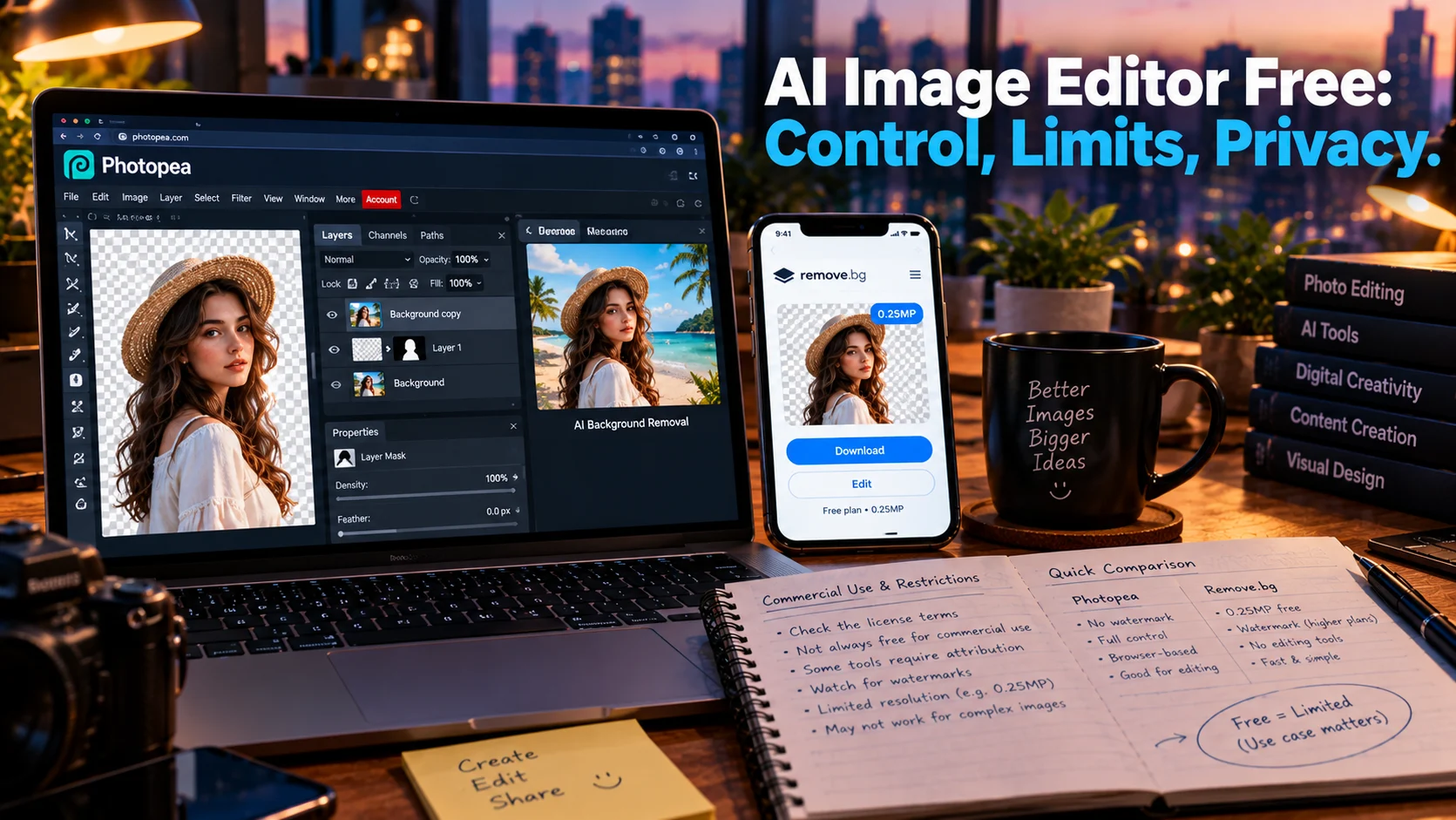
A free AI image editor lets you modify photos using artificial intelligence at no cost, but “free” means different things across tools. Photopea offers a full professional editor with AI background removal that runs entirely in your browser without uploading files, Remove.bg provides unlimited background removals capped at 0.25 megapixels, and VEED offers prompt-based editing with AI credits.
At-a-Glance: Key Takeaways
- Photopea is the most capable free option for full manual control, with layers, masks, PSD support, and AI background removal that runs locally without uploading files .
- Remove.bg offers unlimited free background removals but caps output at 0.25 megapixels, unsuitable for print or product photography .
- VEED’s AI Image Editor is prompt-based, letting you describe edits in plain language using models like Nano Banana Pro and Flux 2, with no credit card required to start .
- Krea offers 100 free compute units daily for creative AI edits, but commercial use requires a paid plan .
- Recraft provides up to 30 free generations daily without watermarks, but restricts free output to non-commercial use .
- Adobe Firefly’s free tier is limited, with paid plans unlocking unlimited standard generations and premium features .
What Is a Free AI Image Editor?
A free AI image editor is a tool that applies artificial intelligence to photo manipulation at no cost. The category spans professional-grade editors with AI features, single-purpose tools for background removal, and prompt-based editors that generate or modify images from text descriptions.
The search intent is commercial investigation. Users want to know which free tools produce usable output, what the limitations are, and whether the results justify the trade-offs in resolution, watermarking, and commercial rights.
The honest answer depends entirely on the task. Background removal for a social thumbnail is a different problem than retouching a product photo for print. The tools that excel at one may fail at the other.
The Major Free AI Image Editors Compared
Photopea: The Professional Free Editor
Photopea is the most capable free option for users who want full manual control alongside AI features. It is a browser-based editor that mimics Photoshop’s interface and capabilities .
What Free Includes
Photopea offers layers, masks, smart objects, layer styles, channels, and vector paths. It opens and saves native PSD files, plus AI, Figma, SVG, PDF, and over 40 other formats including RAW files from major camera brands. AI features include one-click background removal and generative fill from text descriptions .
Critically for privacy-conscious users, Photopea processes everything locally in your browser. Files are not uploaded to external servers. The editor runs on your device’s CPU and GPU .
Where the Limits Hit
The interface is technical. Photopea assumes familiarity with professional editing concepts like layers and masks. Users seeking simple prompt-based editing will find it overwhelming .
Some premium features may require a subscription or viewing an ad. The core editor is free, but the business model includes advertising .
Editorial interpretation: Photopea is the best free option for users who need precise control and are willing to learn a professional tool. It is not a “describe what you want and click a button” experience.
Remove.bg: Unlimited at Low Resolution
Remove.bg does one thing and does it well: it removes backgrounds from images using AI .
What Free Includes
The free tier offers unlimited background removals with no monthly cap. There is no watermark. The output is clean and precise .
Where the Limits Hit
Every free result is capped at 0.25 megapixels and returned as a low-resolution preview. This is fine for social media thumbnails, mockups, and testing whether a cutout works. It is not suitable for print, product photography, or client deliverables .
High-resolution output up to 50 megapixels requires a paid plan starting at $9/month, or pay-as-you-go from $1 per image .
Editorial interpretation: Remove.bg’s free tier is genuinely useful for its intended purpose: quick, low-resolution background removal. The resolution cap is the only limitation, and it is clearly communicated. There is no watermark trickery or hidden renewal jump .
VEED: Prompt-Based Editing
VEED launched its AI Image Editor in October 2026 as a browser tool that edits photos based on plain-language descriptions .
What Free Includes
You can upload an image, select an AI model (Nano Banana Pro, Qwen Image Edit, Flux 2, Seedream), and describe the change you want: “change the text to SALE 50%” or “remove the person in the background.” You can upload up to two reference images and use both in a single edit. No credit card is required to start .
Where the Limits Hit
Edits run on AI credits. Each model shows its credit cost in the selection menu, so fast models cost less than high-fidelity ones. The free allowance depends on the credit balance at signup. The tool is designed for marketers and creators getting photos ready for social and ads, not for professional retouching .
Editorial interpretation: VEED’s approach is the most accessible for non-technical users. Describe the edit, pick a model, get results. The trade-off is less precise control than Photopea and credit consumption per edit.
Krea: Creative AI Edits
Krea is an AI-first creative tool for experimenting with images and making specific changes without starting over .
What Free Includes
The free plan includes 100 compute units daily, no credit card required. You can upload your own photo or use a generated image, then make specific changes, work with visual references, or enhance the image with its optimization tools .
Krea 3, launched in October 2026, is positioned for commercial teams with regional editing, bounding boxes, and LoRA training for product consistency. However, this is a paid product at $0.03-$0.06 per image .
Where the Limits Hit
The free plan does not include the full Krea model library or a commercial license. Commercial use requires a paid plan. The 100 daily compute units are sufficient for experimentation but not sustained production .
Editorial interpretation: Krea is best for users who want to explore creative variations and learn how AI editing models behave. It is not a production tool on the free tier.
Recraft: Daily Generations Without Watermarks
Recraft is a comprehensive free browser editor for AI-assisted design work .
What Free Includes
Up to 30 generations and edits daily without watermarks. Features include background removal and replacement, object erasure, upscaling, recoloring, vectorization, and prompt-based edits from the same workspace .
Where the Limits Hit
Free account output is restricted to non-commercial use. Commercial rights are included only in paid plans. The daily generation cap is reasonable for testing but insufficient for batch work .
Editorial interpretation: Recraft offers a strong balance of features and free allowance. The non-commercial restriction is the key limitation for anyone using it for client work.
Adobe Firefly: Limited Free Access
Adobe Firefly’s free tier offers limited generative features. Paid plans unlock unlimited standard image and vector generation, such as Generative Fill in Photoshop, without credit deductions .
Where the Limits Hit
Free users have restricted access to Firefly-powered asset creation. To continue creating beyond the free allowance, users must subscribe to a paid plan. The free tier is designed as a trial, not an ongoing workflow .
Editorial interpretation: Adobe’s free tier is useful for testing Firefly’s capabilities within Adobe’s ecosystem. For sustained use, the paid plan is required.
Where the Paywall Actually Lands
Across free AI image editors, the pattern is consistent but the specifics vary.
Resolution is the most common cap. Remove.bg limits free output to 0.25 megapixels. Photopea does not cap resolution but gates some premium features. VEED and Krea meter via credits .
Commercial use is often restricted. Krea and Recraft prohibit commercial use on free tiers. Photopea allows commercial use but with advertising. Remove.bg allows commercial use within the resolution cap .
Watermarks are rare but exist. Recraft explicitly offers no watermarks. Remove.bg has no watermark. Photopea’s free version may show ads but does not watermark output .
Daily or monthly caps limit volume. Krea’s 100 compute units, Recraft’s 30 generations, and VEED’s AI credits all impose limits that make sustained production difficult without upgrading .
Privacy and Security Considerations
Privacy varies dramatically across free AI image editors.
Local processing is the gold standard. Photopea processes everything in your browser without uploading files to external servers. This makes it the safest option for sensitive images .
Cloud-based tools require trust. Remove.bg, VEED, Krea, and Recraft upload your images to their servers for processing. Review their privacy policies before uploading sensitive content.
What to check:
- Whether images are used for model training
- How long uploaded images are retained
- Whether you can delete your data
- The tool’s data processing agreement
Important distinction: No SOC 2 certification or similar compliance framework is typically referenced for free AI image editors. They are consumer products. Do not upload confidential or personal images without reviewing the privacy policy.
Who Should Use a Free AI Image Editor
Users needing professional control with AI assistance should use Photopea. It offers full layers, masks, PSD support, and local processing without uploading files .
Anyone needing quick background removal for social media should use Remove.bg’s unlimited free tier, accepting the 0.25MP resolution cap .
Non-technical users who want to describe edits in plain language should try VEED’s AI Image Editor for prompt-based changes .
Creators testing AI editing capabilities can use Krea’s 100 daily compute units or Recraft’s 30 daily generations to experiment without commitment .
Anyone needing commercial output must check the specific tool’s terms. Krea and Recraft prohibit commercial use on free tiers. Remove.bg allows it within resolution limits. Photopea allows it with advertising .
Common Mistakes and Cautions
Assuming free means full resolution. Remove.bg’s 0.25MP cap makes free output unsuitable for print or product photography. The tool is honest about this, but users who skip the fine print are surprised .
Overlooking commercial restrictions. Krea and Recraft free tiers are non-commercial. Using their output for client work violates the terms .
Uploading sensitive images without checking privacy. Only Photopea processes locally. All other tools on this list upload images to servers .
Expecting prompt-based editing precision from Photopea. Photopea is a manual editor with AI features. It does not work like VEED or Krea where you describe the change and click a button.
Forgetting that credits deplete. VEED’s AI credits and Krea’s compute units are consumed per edit. Plan edits before spending credits.
Frequently Asked Questions
What is the best free AI image editor?
Photopea is the most capable free option for full manual control with AI features, running locally without uploading files. Remove.bg is best for unlimited free background removal at low resolution. VEED is best for prompt-based editing for non-technical users .
Is Photopea really free?
Yes. Photopea offers a full professional editor for free, including layers, masks, PSD support, and AI background removal. Some premium features may require a subscription or viewing an ad. The core editor is free and runs locally in your browser .
Can I use free AI image editors for commercial work?
It depends on the tool. Photopea allows commercial use (with ads). Remove.bg allows commercial use within its 0.25MP resolution cap. Krea and Recraft prohibit commercial use on their free tiers. VEED’s commercial terms depend on the plan .
What is the resolution limit for Remove.bg free?
Remove.bg’s free tier caps output at 0.25 megapixels and returns low-resolution previews. High-resolution output up to 50 megapixels requires a paid plan starting at $9/month .
Does Photopea upload my images to a server?
No. Photopea processes everything locally in your browser using your device’s CPU and GPU. Files are not uploaded to external servers, making it the safest free option for sensitive images .
Conclusion
Free AI image editors offer genuinely useful capabilities, but the experience is defined by the specific limitations of each tool. Photopea provides professional-grade control with AI features and local processing. Remove.bg delivers unlimited background removal at low resolution. VEED offers the most accessible prompt-based editing.