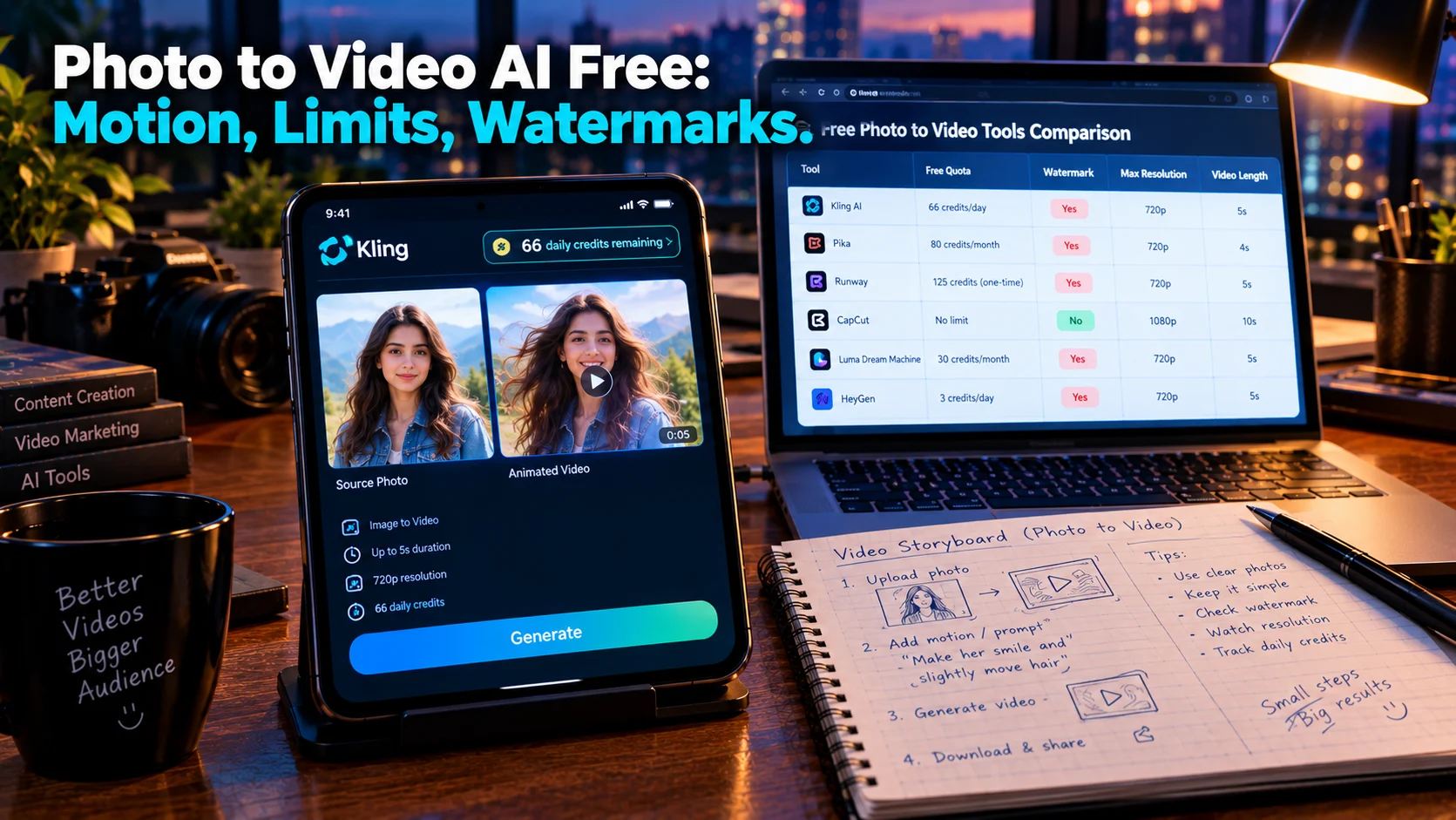
A free photo to video AI tool animates a still image into a short clip at no cost. Kling offers 66 daily credits with the best motion quality for portraits and products, Hailuo returns 6-second 720p clips quickly, LTX Buzz provides free image-to-video with no render limits on core tools, and Swoopen gives 30 free credits to start. Every free export carries a watermark or restricts commercial use.
At-a-Glance: Key Takeaways
- Kling is the best free option for motion quality, with 66 daily credits that expire after 24 hours. Free output is watermarked, non-commercial, and low-resolution .
- Hailuo provides a quick way to turn still images into videos, generating 6-second clips at 720p from uploaded images. However, free exports include watermarks and do not grant commercial usage rights.
- – LTX Buzz offers free image-to-video generation with no rendering limits on its core tools, powered by Lightricks’ LTX AI model. However, the app includes in-app purchases, and user reports indicate mixed reliability.
- Swoopen provides 30 free credits valid for 30 days, enough for roughly two 4-second clips, with 180+ effect templates and sound included .
- Every free tier restricts commercial use, and watermarks are standard across hosted tools. The only exception is open-source models that require your own hardware.
- Meta’s Muse Video and Movie Gen are not free public tools. They are research previews or ecosystem features with 10-second limits and regional restrictions .
What Is Free Photo to Video AI?
Free photo to video AI refers to tools that animate a static image into a short video clip at no cost. You upload a photo, describe the motion you want, and the model generates a clip that preserves the original composition while adding movement.
The search intent is commercial investigation. Users want to know which free tools produce usable motion, what the limitations are, and whether the results are worth the trade-offs in quality, watermarking, and commercial rights.
The honest answer is that free photo to video is a testing ground, not a production pipeline. The tools are capable enough to evaluate motion quality and learn prompt behavior. They are not capable enough to ship client work without upgrading.
The Major Free Photo to Video Tools Compared
| Kling | 66 credits/day | Low (free tier) | Yes | No | Portrait and product i2v |
| Hailuo | Small daily credits | 720p | Yes | No | Fast i2v, character animation |
| LTX Buzz | Free core tools | High-res claimed | Not specified | Not specified | Quick photo animation |
| Swoopen | 30 signup credits | Not specified | Likely | Paid only | Viral effect templates |
| Luma | ~30 gens/month | 720p | Yes | No | Cinematic atmosphere |
Important caveat: Free tier details change frequently. Verify current terms before committing time to any tool.
Kling: Best Free Photo to Video Quality
Kling’s free tier is the standout for photo to video specifically. The platform gives 66 credits daily that expire after 24 hours, enough to test prompts and compare models for weeks before paying .
What Free Includes
The free tier requires no card. Free generations wait longer in the queue at peak hours, and the newest models and features usually require a paid plan .
Where the Limits Hit
Free output is watermarked, non-commercial, and low-resolution. It is enough to test the tool, not to produce publishable work . Commercial use requires a paid plan.
Editorial interpretation: Kling’s free tier is the best option for learning what modern photo to video models can do. The daily reset means missed days are lost credits, but the allowance is sufficient for consistent experimentation.
Hailuo: Fastest Photo to Motion
Hailuo, from MiniMax, is one of the quickest free ways to animate an existing image. Upload a frame, describe the motion, and the free tier returns a 6-second 720p clip .
What Free Includes
The free tier gives daily bonus credits, typically enough for two or three short 768p videos. MiniMax adjusts the exact allowance often and publishes it only in-app .
Where the Limits Hit
Free exports are watermarked, resolution tops out around 720p, you can queue only a few tasks at a time, and daily credits vanish at reset. No commercial rights are included .
Editorial interpretation: Hailuo is the best free option when you have a still image and want to see it move with minimal friction. The trade-off is watermarked, non-commercial output.
LTX Buzz: Free Image-to-Video with Caveats
LTX Buzz from Lightricks is a free iOS app that transforms images into videos using the LTX AI model. It advertises “no render limits on core tools” and high-resolution output .
What Free Includes
The app offers free text-to-image and image-to-video generation (I2V), plus trending presets like Egg Pop and Bald It. In-app purchases unlock premium tools including advanced editing, AI headshots, and multi-layer design .
Where the Limits Hit
The App Store listing shows in-app purchases ranging from $9.99 to $99.99 for LTX Buzz Pro. The app has a 4.5 rating from 58 reviews, but the “no render limits” claim applies only to core tools, not the full feature set. Independent testing of output quality and actual limits is limited .
Editorial interpretation: LTX Buzz is worth testing for free photo animation on iOS, but the premium upsell and limited independent verification warrant caution.
Swoopen: Effect Templates with Credits
Swoopen is an Android and iOS app that turns a single photo into a 4-10 second video with sound, using 180+ effect templates .
What Free Includes
New accounts receive 30 free credits valid for 30 days. A 4-second video costs 15 credits, a 6-second video costs 19, an 8-second video costs 23, and a 10-second video costs 26. The free allowance is enough for roughly two 4-second clips .
Where the Limits Hit
Credits expire after 30 days. The cost structure means free users get very few clips. The app collects personal info, financial info, and other data types, though it states data is encrypted in transit and can be deleted on request .
Editorial interpretation: Swoopen is best for testing specific viral effect templates, not for sustained photo-to-video workflows.
Luma Dream Machine: Cinematic at Low Volume
Luma’s free tier offers a limited monthly allowance for cinematic-style motion.
What Free Includes
Approximately 30 generations per month at 720p. Output carries a watermark and commercial use is not permitted. Unused generations do not roll over .
Where the Limits Hit
At roughly 30 generations monthly, Luma’s free tier is designed to demo the model, not run a workflow. Each generation costs 1-5 credits depending on length, meaning the 30-credit allowance yields fewer clips than the number suggests .
Editorial interpretation: Luma is best for evaluating cinematic motion quality on slower, atmospheric scenes. It is not a volume tool on the free tier.
What About Meta’s Photo to Video Tools?
Search results include Meta’s Movie Gen and Muse Video, but these are not free public tools in the way the others are.
Movie Gen is a research project that can transform a personal image into a video, but it is not a publicly available product. Meta partnered with Blumhouse filmmakers for testing, not general users .
Muse Video is an early preview from Meta Superintelligence Labs, built on the same pretraining base as Muse Image. It is “coming soon” to creators and Meta AI, with no free tier announced. It ranks No. 3 in human-preference Elo for text-to-video on Arena, but photo-to-video capabilities are unverified .
Meta AI video editing allows uploading videos up to 10 seconds and regenerating them with new styles, but this is video editing, not photo-to-video generation .
Editorial interpretation: Meta’s tools are not viable free options for photo to video today. They are either research projects, ecosystem features with 10-second limits, or unreleased previews.
Where the Paywall Actually Lands
Across every free photo to video tool on this list, the pattern is identical.
Watermarks are universal. Every free video export carries a visible platform watermark. The watermark-free clip you see on social media was rendered on a paid plan .
Commercial use is prohibited. No free tier on this list allows clean commercial output. Kling, Hailuo, Luma, and Swoopen all require paid plans for commercial rights .
Resolution is capped. Free output ranges from low-resolution (Kling free tier) to 720p (Hailuo, Luma). Acceptable for mobile viewing after platform compression. Noticeable on desktop.
Credits do not roll over. Kling’s daily credits expire after 24 hours. Hailuo’s daily credits vanish at reset. Swoopen’s 30 credits expire after 30 days. Luma’s monthly generations do not roll over .
Daily caps limit volume. Even with credits remaining, free tiers often impose daily generation caps. Kling’s free tier is for testing, not production .
Privacy and Security Considerations
Free photo to video tools process your uploaded images and prompts on remote servers. Most are consumer-grade tools without enterprise security certifications.
What to check before uploading:
- Whether your images are used for model training
- How long uploaded images and generated clips are stored
- Whether you can delete your data
- The tool’s terms for ownership of generated video
Important distinction: No SOC 2 certification or similar compliance framework is typically referenced for free photo to video tools. They are consumer products. Do not upload sensitive or confidential images without reviewing the privacy policy.
Swoopen’s Google Play listing states data is encrypted in transit and can be deleted on request, but it also notes collection of personal and financial info .
Who Should Use a Free Photo to Video Tool
Hobbyists and curious creators can use Kling’s daily credits to learn how photo to video models behave. The 66 daily credits are sufficient for testing prompts and comparing motion quality .
Users animating portraits or character shots should start with Hailuo for speed or Kling for quality, accepting the daily limits and watermarks .
iOS users wanting a free app can test LTX Buzz’s core image-to-video features, accepting the premium upsell and limited independent verification .
Social media creators testing viral effects can use Swoopen’s 30 free credits to try specific templates, accepting the 30-day expiry and credit costs .
Anyone needing commercial output must upgrade. No free tier on this list permits it cleanly.
Common Mistakes and Cautions
Assuming “free” means usable for client work. Every free export is watermarked and non-commercial. The watermark is the business model .
Underestimating credit consumption. Swoopen’s 30 free credits yield roughly two 4-second clips. Kling’s 66 daily credits are for testing, not production .
Forgetting daily resets. Credits do not accumulate. Miss a day, lose that day’s allowance. Storyboard with free image tools first, then spend video credits on the final animation .
Expecting long clips. Free tiers cap at 5 to 10 seconds. Anything longer requires paid plans or multi-clip stitching.
Confusing Meta’s research tools with available products. Movie Gen and Muse Video are not free public photo-to-video generators. They are research previews or ecosystem features .
Frequently Asked Questions
What is the best free photo to video AI?
Kling offers the best motion quality for portraits and product shots with 66 daily credits. Hailuo is fastest for animating a still image. LTX Buzz provides free image-to-video on iOS with no render limits on core tools. The best depends on whether you prioritize quality, speed, or platform .
Are there any free photo to video tools without watermarks?
No hosted free tier on this list provides watermark-free output directly. Open-source models can run locally without watermarks, but require GPU hardware and technical setup.
Can I use free photo to video output commercially?
No. Every free tier on this list prohibits commercial use. Commercial rights require a paid plan.
How long are free photo to video clips?
Most free tiers cap at 5 to 10 seconds. Hailuo returns 6-second 720p clips. Swoopen offers 4-10 second clips at credit costs. Resolution ranges from low-res (Kling free tier) to 720p (Hailuo, Luma) .
Is Meta’s photo to video tool free?
No. Movie Gen is a research project not publicly available. Muse Video is an unreleased preview. Meta AI video editing allows 10-second video regeneration, but this is not photo-to-video generation .
Conclusion
Free photo to video AI tools offer a genuine testing ground for learning how models interpret motion prompts. Kling leads on output quality with 66 daily credits. Hailuo is fastest from still to motion. LTX Buzz provides a free iOS option with caveats. Swoopen offers viral effect templates at credit costs. Luma delivers cinematic atmosphere at low volume.