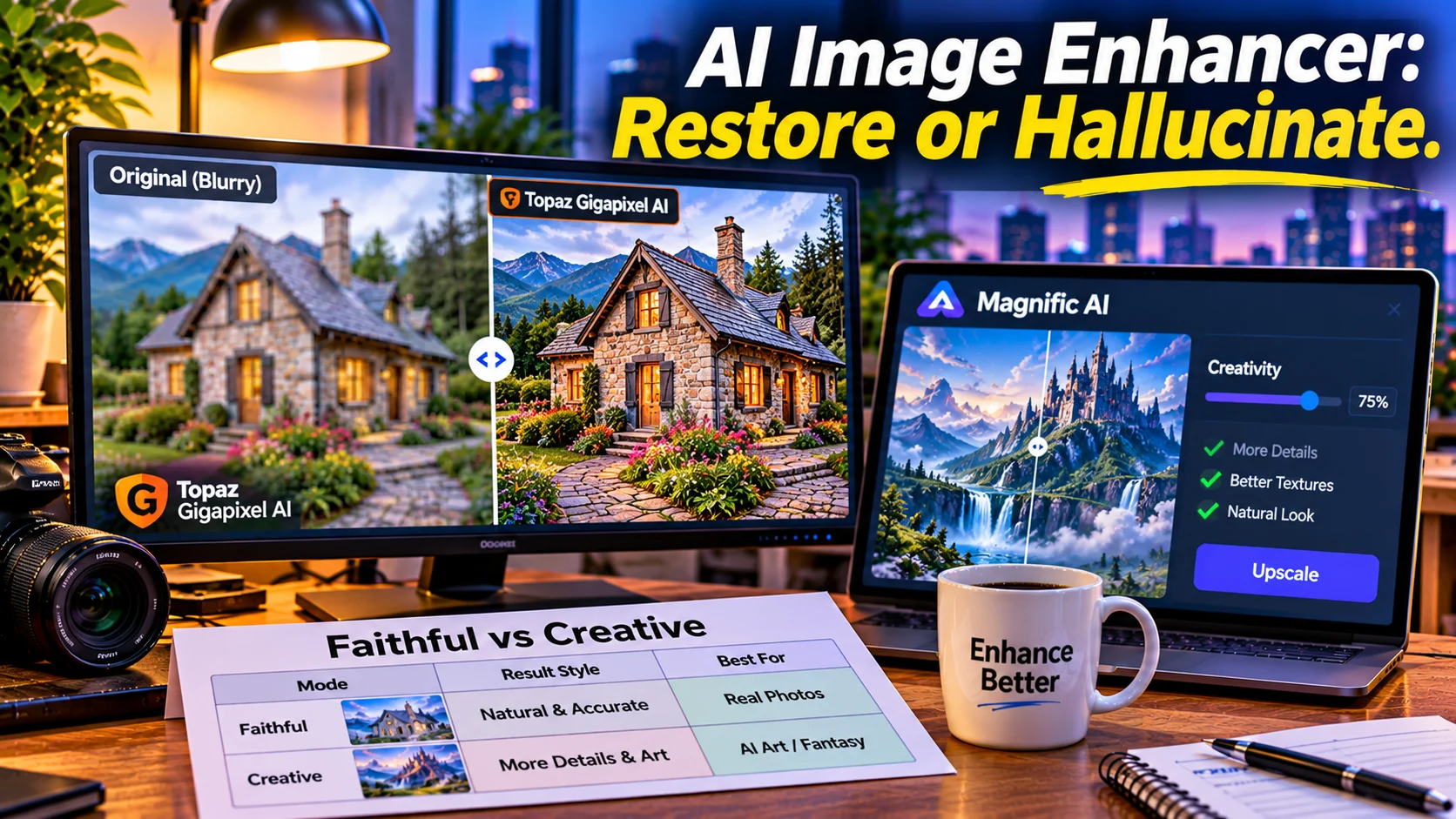
An AI image enhancer is a tool that increases image resolution and improves visual quality using machine learning. The category splits into two fundamentally different approaches: faithful restoration tools like Topaz Gigapixel AI that preserve original details, and creative enhancement tools like Magnific that invent new detail to make AI-generated images look photorealistic. Choosing the wrong type for your use case produces either blurry results or uncanny artifacts.
At-a-Glance: Key Takeaways
- Two types of AI enhancement exist: faithful restoration (Topaz Gigapixel) and creative hallucination (Magnific). They serve opposite purposes and are not interchangeable .
- Topaz Gigapixel AI is the industry standard for restoration, first released in 2019 and used by professional photographers for print, archival, and forensic work .
- Magnific AI is built for AI-generated art, adding pores, fabric texture, and environmental detail that was never in the original image .
- Free browser-based options exist, including ClarityUp 4K which upscales locally without uploading files, and Unpixelate which offers two free runs daily .
- Topaz runs locally on your hardware, keeping files on your machine for privacy. Magnific is cloud-based and requires uploads .
- Hardware matters for local tools: Topaz generative models require 8GB+ VRAM and 16GB+ RAM on Apple Silicon .
What Is an AI Image Enhancer?
An AI image enhancer is software that uses neural networks to increase an image’s resolution, sharpen details, remove artifacts, and improve overall visual quality. It is not simply resizing. Traditional resizing uses interpolation, which stretches existing pixels and produces blurry results. AI enhancers analyze the image content and generate new pixels that fit the original structure .
The category has expanded rapidly because two distinct problems demand different solutions. The first is restoration: making an old, blurry, or low-resolution photo look as good as it can while staying true to what was actually captured. The second is creative enhancement: making an AI-generated image look like a real photograph by adding the micro-details that generative models miss, like skin pores, fabric weave, and environmental grit.
These are not the same task, and the tools that excel at one often fail at the other.
The Two Types of AI Enhancement
Chase Jarvis’s 2026 guide articulates the distinction clearly: faithful restoration and creative enhancement are different goals that require different tools .
Faithful Restoration
The goal is fidelity. The enhanced image should look exactly like the original, just sharper and larger. If the subject has large pores, those pores should remain. If the fabric is denim, it should not become silk.
Best tool: Topaz Gigapixel AI .
Creative Enhancement (Hallucination)
The goal is hyper-realism. The tool is given permission to invent details that were never in the original file, filling in texture, stray hairs, and environmental noise to sell the illusion of high resolution. This is particularly useful for AI-generated images, which often look flat and plastic at their native resolution.
The practical implication is straightforward. Using a creative enhancer on a historical photograph risks altering faces and fabricating details that never existed. Using a faithful restorer on a Midjourney output leaves the plastic look intact.
Topaz Gigapixel AI: The Restoration Standard
Topaz Labs released Gigapixel AI in 2019 as the first commercially available AI image upscaler. It has processed over 2 billion images and is used by professional photographers, fine artists, and print reproduction specialists .
How It Works
Gigapixel runs locally on your machine, using your GPU to analyze the image. It recognizes specific structures like feathers, fur, architectural lines, and text, and applies enhancement models tuned to those content types . Your files never leave your computer, which matters for confidential or proprietary material .
The platform offers nine enhancement models. The Standard model handles most work, balancing sharpness with noise reduction. The Low Resolution model is aggressive about fixing JPEG artifacts in tiny web images. The Recover model is designed for old photos, cityscapes, and images with linework .
Where It Falls Short
Gigapixel’s generative models have hardware requirements. Recover and Redefine require a dedicated GPU with 8GB+ VRAM and 24GB+ system RAM on ARM-based systems. On systems that do not meet these requirements, cloud rendering is the fallback .
The Face Recovery feature can also be overused. Pushed too far, subjects begin to look like wax figures .
Pricing
Topaz Gigapixel is available in the Topaz Studio subscription. The Personal plan is $19/month billed annually, with unlimited local and cloud rendering. Commercial use is included for organizations under $1M annual revenue. The Pro plan at $54/month adds local access to additional models .
Magnific AI: The Creative Engine
Magnific AI changed the creative upscaling space in late 2023. Unlike Topaz, it functions as a “hallucination engine,” using diffusion-based technology to dream up new details based on your image and prompt .
How It Works
Magnific exposes two critical controls: Creativity and Resemblance. The Creativity slider determines how much new detail the AI invents. Set to zero, it behaves like a normal upscaler. Cranked to maximum, it adds wrinkles to skin, stitching to clothes, and leaves to trees .
The platform also accepts text prompts. If you are upscaling a portrait, you can type “highly detailed skin texture, 8k, photography,” and the AI will inject those specific details into the upscale process .
Where It Falls Short
Magnific is cloud-based and expensive. More importantly, it will change your image. If you upscale a photograph of a specific person with high creativity, it may slightly alter their facial structure . This is not a bug; it is the mechanism. But it makes Magnific unsuitable for documentary, forensic, or archival work.
Who It Suits
Magnific is essential for anyone working with Midjourney, DALL-E, or Stable Diffusion outputs. It turns a flat 1024px generation into a 4K image that looks indistinguishable from a high-end photoshoot . Futurepedia’s course notes that Magnific is “especially well-suited for artificial images rather than real photos” .
Free and Low-Cost Alternatives
Not every enhancement task justifies a subscription. Several free options exist, with different trade-offs.
ClarityUp 4K
ClarityUp 4K is a free AI upscaler that runs entirely in your browser. The AI model processes images locally, so files are never uploaded to a server. There is no signup, no watermark, and no usage limit. It sharpens and enlarges low-resolution photos up to 4K .
The limitation is that browser-based processing is constrained by your device’s capabilities. It is suitable for casual enhancement, not for high-volume or high-resolution work.
Unpixelate
Unpixelate is a free AI tool for turning pixelated, blurry, and low-resolution pictures into sharp images. It offers Standard and HD modes, a before-and-after slider, and no watermarks. Standard is free with no account (two runs per day for guests), with daily free credits after signing in. HD uses a stronger model tuned for facial detail and fine texture .
NVIDIA RTX Video Super Resolution
For users with RTX GPUs, NVIDIA offers RTX Video Super Resolution. While primarily positioned for video, it is available as a Python package and ComfyUI node for image workflows. It delivers 4K upscaling 30x faster than alternative local upscalers, running directly on RTX GPU Tensor Cores .
The limitation is hardware dependency. This requires an NVIDIA RTX GPU, which not every user has.
Key Features to Evaluate
The Model Selection
Both Topaz and Magnific offer multiple models tuned for different content types. Topaz’s Standard, Low Resolution, Recover, and Redefine models serve different purposes. Choosing the right model matters more than choosing the right tool .
The Slider Problem
Magnific’s Creativity slider is both its strength and its risk. The same control that adds realistic skin texture can also alter facial structure. Users must balance realism against fidelity, and the right setting depends entirely on the image and the intended use .
Local vs. Cloud Processing
Topaz processes locally, keeping files on your machine. Magnific processes in the cloud, requiring uploads. For confidential, forensic, or client work under NDA, this distinction is decisive .
Batch Processing and Workflow Integration
Topaz integrates with Photoshop and Lightroom as a plugin, and works as a standalone app. It supports batch processing for high-volume work . Magnific is browser-based, with credit-based usage.
Who Should Use Which Type
Photographers, print reproduction specialists, and archivists should use Topaz Gigapixel AI. The faithful restoration approach preserves original details and respects the source material. Local processing keeps files secure .
AI artists, concept designers, and Midjourney users should use Magnific AI. The creative hallucination approach adds the micro-details that generative models miss, making AI outputs look photorealistic .
Casual users with occasional needs should try ClarityUp 4K or Unpixelate. Both are free and require no commitment .
Users with RTX GPUs can use NVIDIA’s RTX Video Super Resolution for fast, local upscaling without a subscription .
Common Mistakes and Cautions
Using the wrong type of enhancer. A creative enhancer on a historical photo will invent details that never existed. A faithful restorer on an AI-generated image will leave the plastic look intact. Match the tool to the goal .
Overusing Face Recovery. Topaz’s Face Recovery can reconstruct faces that are slightly out of focus, but pushed too far, subjects look like wax figures .
Ignoring hardware requirements. Topaz’s generative models require 8GB+ VRAM and, on Apple Silicon, 16GB+ RAM. Systems that do not meet these requirements must use cloud rendering .
Expecting Magnific to preserve likeness. Magnific will change your image. If the subject’s exact facial structure matters, use a faithful restorer instead .
Assuming free tools are sufficient for print. Browser-based upscalers are convenient, but they are constrained by device capabilities and may not produce print-quality output .
Frequently Asked Questions
What is the best AI image enhancer?
It depends on the goal. Topaz Gigapixel AI is the best for faithful restoration and print work. Magnific AI is the best for creative enhancement of AI-generated images. The two serve opposite purposes and are not interchangeable .
What is the difference between AI upscaling and AI enhancement?
Upscaling increases resolution. Enhancement improves quality by adding detail, removing artifacts, and correcting blur. Faithful enhancement preserves original details. Creative enhancement invents new details to sell the illusion of higher resolution .
Can I enhance images for free?
Yes. ClarityUp 4K runs in your browser with no signup, watermark, or usage limit, upscaling to 4K locally . Unpixelate offers two free runs daily for guests, with no watermarks . NVIDIA RTX Video Super Resolution is free for users with RTX GPUs .
Is Topaz Gigapixel better than Magnific?
Neither is “better.” Topaz is better for restoration and print. Magnific is better for AI art and creative work. Using the wrong tool for the task produces poor results regardless of the tool’s quality .
Does AI enhancement work on old, blurry photos?
Yes, with caveats. Topaz’s Recover model is designed for old photos, cityscapes, and images with linework. It can reconstruct detail and fix artifacts. However, it cannot recover information that was never captured. Pushed too far, it may invent details that look plausible but are not accurate .
Conclusion
AI image enhancers are not a single category. Faithful restoration tools like Topaz Gigapixel AI preserve what was captured, sharpening and enlarging without inventing. Creative enhancement tools like Magnific AI invent what was missing, adding texture and detail to make AI-generated images look real.