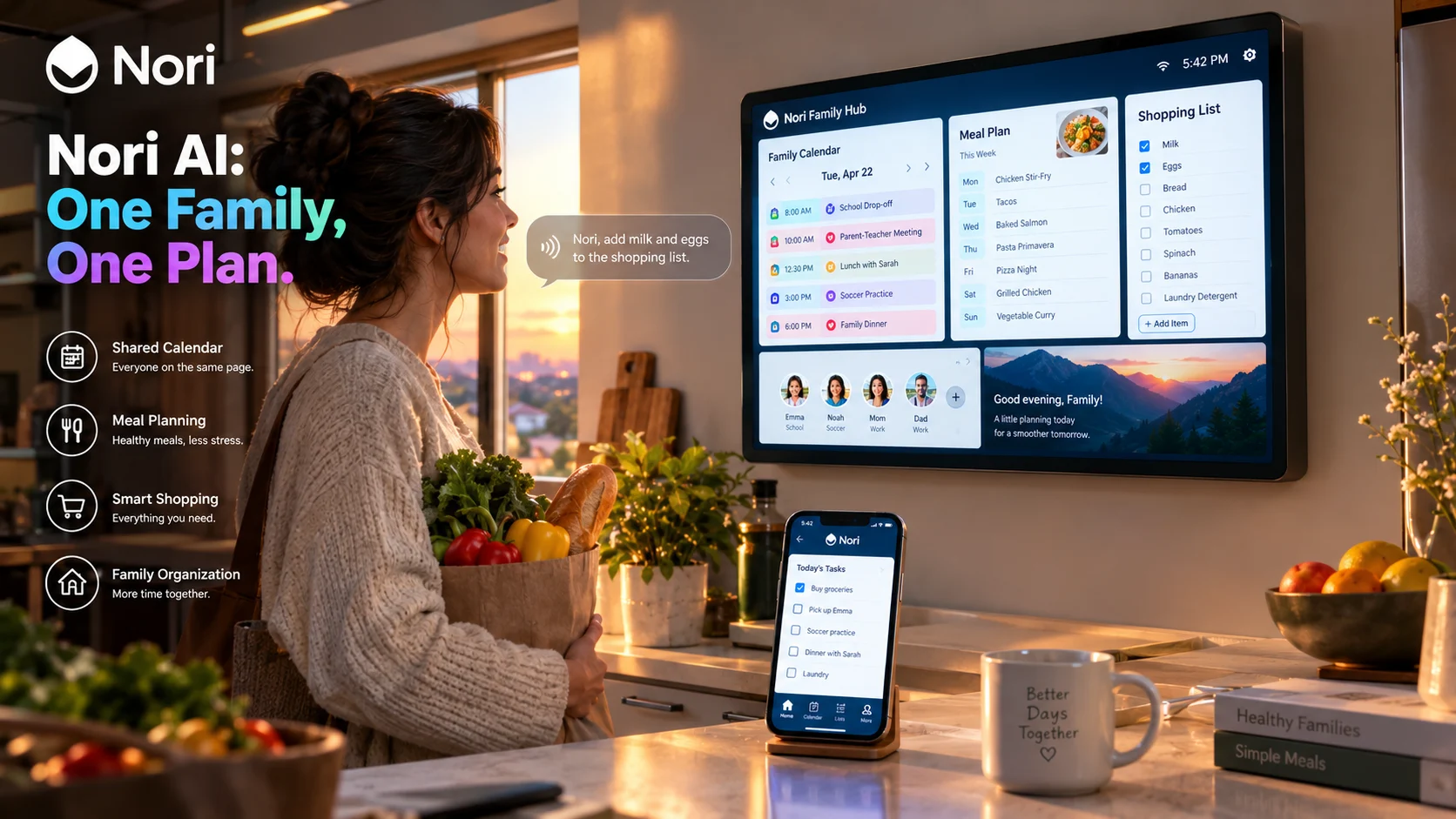
Nori AI is a family organization platform that combines shared calendars, tasks, meal planning, recipes, and shopping lists with an AI assistant that can turn emails, photos, voice requests, and messages into structured family plans. Nori Plus costs $7.99 per month per family, covering unlimited AI chat, voice input, and multi-step Agent mode for every family member.
At-a-Glance: Key Takeaways
- One subscription covers the whole family. When one member upgrades to Nori Plus, everyone in the family gets unlimited AI access at no extra charge .
- The free tier includes 10 AI uses alongside core family tools like calendar, tasks, recipes, meal plan, and shopping list .
- Nori AI accepts voice, text, photos, files, links, and forwarded emails, turning everyday information into calendar events, tasks, recipes, and shopping items .
- Agent mode handles multi-step planning for trips, birthdays, and routines that span multiple family members and schedule dependencies .
- Privacy is a design priority. The Nori Family Hub has no camera and includes a physical microphone switch. Nori states it does not permit third-party AI providers to train on family data .
- Optional 15.6-inch Family Hub provides a shared home display for viewing plans and making voice requests .
What Is Nori AI?
Nori AI is the artificial intelligence layer inside Nori, a family organization platform built by Domus Next Inc. The company is headquartered in San Francisco and was founded by Isaac Long, a former ByteDance AI product lead and Y Combinator alumnus, alongside a co-founder from Samsung with experience in smart home devices .
The product emerged from a familiar household problem: who is cooking, what are we eating, who is buying groceries, and who is picking up the kids. Nori’s answer is a system that connects all family information into one structured space, with an AI agent that can act on it .
Nori operates across three surfaces: the Nori mobile app for setup and detailed edits, the Nori Family Hub (a 15.6-inch shared display) for quick viewing and voice requests, and Nori Web. All surfaces use the same family data, so changes made anywhere reflect everywhere .
The platform had over 100,000 families using it during its January 2026 beta phase .
How Nori AI Works
Input Methods
Nori AI accepts multiple input types, which reduces the friction of getting information into the system :
| Text | Type requests, questions, or family plans |
| Voice | Speak quick requests when typing is inconvenient |
| Photo | Events, recipes, groceries, or fridge contents |
| File | Upload documents to extract useful information |
| Link | Import recipes or analyze information from URLs |
| Forward supported emails for Nori to extract events, tasks, or details |
For example, a parent can forward a school email, and Nori extracts dates and tasks. A photo of a fridge can generate recipe suggestions based on available ingredients. A voice request while cooking can add items to the shopping list .
The Family Context System
Nori’s AI uses “adaptive family context” that learns the family’s tastes, schedule, and dietary needs. This context persists across sessions, so Nori can make relevant suggestions without re-explaining the family’s situation each time .
The result is a system that remembers that Alex has soccer on Tuesdays, that the family avoids shellfish, and that Thursday evenings are busy. When a new request comes in, Nori can apply that context .
Agent Mode
Agent mode is Nori Plus’s most advanced capability. It handles multi-step plans that involve multiple family members and dependencies. Examples include planning a birthday party, organizing a trip, or setting up a recurring weekly routine .
The difference from simple task creation is that Agent mode coordinates across the family plan. If practice moves from 4:00 to 5:30, Agent mode can adjust pickup assignments, shift dinner timing, and add “pack cleats” to the task list, all within the same shared workspace .
Key Features
Shared Family Calendar
All family members can add events to the same calendar. The system supports assigning events to specific members, setting recurring schedules, and viewing the family’s combined schedule. The level of detail in event setup exceeds what basic calendar apps offer, including multi-member assignments for shared activities .
Tasks and Routines
Tasks can be assigned to one or multiple family members. Recurring chores like “take out the trash every Wednesday” can be set up once and tracked. Completed tasks sync across all surfaces .
Meal Planning and Recipes
Nori includes a recipe database and supports importing recipes from external links. The meal plan connects to the shopping list: selecting recipes for the week automatically generates the ingredients needed. AI can suggest meals based on family preferences, dietary needs, and schedule constraints .
Shopping List
The shopping list integrates with meal planning. When recipes are selected, ingredients flow into the list. Users can also add items directly or via voice. The list is shared across all family members and surfaces .
Rewards System
Nori includes a rewards feature for family tasks, which can be particularly useful for motivating children to complete chores. Points or rewards can be tracked and redeemed .
Family Hub Integration
The optional Nori Family Hub is a 15.6-inch display designed for shared home spaces. It shows the family calendar, tasks, meal plan, and shopping list. Voice requests work through “Talk to Nori,” which requires Nori Plus or an active hardware trial .
The Hub has no camera and includes a physical microphone switch, giving families direct control over when voice features are active .
Pricing and Plans
Nori’s pricing is simple and family-focused.
Key pricing detail: Nori Plus is per family, not per member. When one person upgrades, everyone in the family gets access. Adding new family members costs nothing extra .
The free plan is not a trial. It is a permanent free tier with core tools and a limited AI allowance. Nori does not offer a separate free trial .
How Nori Compares to Alternatives
Editorial interpretation: Nori’s differentiation is the combination of family-wide AI context and a shared physical display. Cozi is simpler and cheaper for basic organizing. Ollie is better if you want an assistant living in your text messages. Muse handles general web tasks, not family coordination .
Privacy and Security
Nori’s privacy approach combines product design choices with policy commitments.
Product Design
The Nori Family Hub has no camera and includes a physical microphone switch. This gives families direct control over when voice features are active, without relying on software settings .
Data Handling
Nori’s Privacy Policy (last updated March 2026) states the service may process household profiles, connected calendar information, tasks, events, lists, photos, meal-planning activity, communications, and related metadata .
The policy names Gemini and Claude as third-party AI providers. It states that Nori does not permit these providers to use personal information submitted through the service to train generalized models, except as expressly disclosed .
Children’s Privacy
Nori’s policy states the service is not intended for anyone under 13. When Nori has actual knowledge it collects personal information from a child under 13, it obtains verifiable parental consent as required by law. Parents may review, request deletion, or refuse further collection .
What the Policy Does Not Claim
- No SOC 2 or ISO 27001 certifications are mentioned in available documentation
- No Zero Data Retention guarantees are stated
- No independent third-party audits are referenced
Important distinction: SOC 2 certification does not automatically mean zero data retention. Families with strict privacy requirements should review the full privacy policy .
Who Should Use Nori AI
Families with school-age children are the primary audience. The combination of shared calendar, tasks, and meal planning addresses the coordination challenges that arise when multiple children have different schedules and activities .
Busy parents who currently manage family logistics through group texts, paper lists, and scattered calendar apps can consolidate everything into one system. The AI input methods reduce the friction of data entry .
Families with caregivers or extended family involved in childcare benefit from the shared system. Grandparents, nannies, or co-parents can all access the same plan with appropriate permissions .
Users who want a shared home display may find the Family Hub valuable for keeping everyone informed without constant phone checking. The voice interface works well in kitchen or living room contexts .
Families on tight budgets can use the free tier for basic organizing and evaluate Nori Plus only if they need unlimited AI. The per-family pricing means the cost doesn’t scale with family size .
Common Mistakes and Cautions
Assuming the free plan includes unlimited AI. Free families get 10 AI uses total. After that, AI features require Nori Plus. The core organizing tools remain free .
Forgetting that Nori Plus covers the whole family. There’s no need to buy multiple subscriptions. One upgrade covers everyone .
Overlooking the Hub’s additional cost. The Family Hub is $389 as a standalone device. Nori Plus is required for Talk to Nori voice features on the Hub .
Expecting Agent mode on the free plan. Multi-step planning for trips, birthdays, and routines is a Nori Plus feature .
Ignoring the privacy policy. While Nori’s product design includes privacy controls, the policy details what data is processed and shared. Families should review it, especially regarding children’s information .
Frequently Asked Questions
What is Nori AI?
Nori AI is the artificial intelligence assistant within the Nori family organization app. It turns voice requests, emails, photos, and messages into shared calendar events, tasks, meal plans, recipes, and shopping list items. It is designed for family coordination, not general-purpose tasks .
How much does Nori AI cost?
The free plan includes 10 AI uses alongside core family tools. Nori Plus costs $7.99 per month per family, or $59.90 per year, and includes unlimited AI chat, voice input, and Agent mode. One subscription covers all family members .
Is Nori AI private and secure?
The Nori Family Hub has no camera and a physical microphone switch. Nori’s privacy policy states it does not permit third-party AI providers to train on family data. However, no SOC 2 or ISO certifications are mentioned, and the policy details what data is processed. Families should review the full policy .
How does Nori AI compare to Cozi?
Cozi is a simpler, cheaper family organizer with a strong free plan and mature calendar features. Nori adds system-wide AI, multi-input capture, Agent mode for complex planning, and an optional shared display. Cozi Max includes task-specific AI for $79/year; Nori Plus includes broader AI for $59.90/year .
Does Nori AI work without the Family Hub?
Yes. Nori works across the app and web without the Hub. The Hub is an optional additional purchase for families who want a shared home display and voice interface .
Conclusion
Nori AI addresses the coordination problem that every busy family faces: information scattered across emails, texts, calendars, and verbal reminders. By connecting calendars, tasks, meals, recipes, and shopping lists into one system, and adding an AI agent that can act on voice, photo, email, and text inputs, Nori turns family chaos into shared plans.
What matters most is fit. Nori is not a general-purpose AI assistant. It is a family operations system with AI embedded. The free tier provides genuine value for basic organizing. Nori Plus unlocks the AI capabilities that make the system feel proactive rather than passive.
Nori may suit families with school-age children managing complex schedules, parents who want to reduce mental load, and households that benefit from a shared display. It may not suit individuals seeking a personal AI agent, families deeply invested in the Cozi ecosystem, or those uncomfortable with cloud-based family data.
Before committing, evaluate whether the free tier’s 10 AI uses are sufficient for your needs. Consider whether the Family Hub’s shared display fits your home. And review the privacy policy to confirm the data handling practices align with your family’s preferences. Nori’s strength is coordination, but coordination requires trust.