Canva’s AI image generator is powered by Canva Craft, the company’s first in-house model released in October 2026. Craft uses a two-stage architecture that plans composition and typography before rendering, and it ranks fourth globally on DesignArena. Free accounts get limited AI uses, while Pro provides up to 200 premium AI uses monthly.
At-a-Glance: Key Takeaways
- Canva Craft is Canva’s first proprietary image model, trained on millions of human-designed templates rather than photographs, giving it a design-first orientation .
- Craft debuted fourth on DesignArena, ranking #1 for People & Portraits and Landscapes & Nature, and #2 for Abstract & Patterns .
- The two-stage architecture separates planning from rendering, allowing the model to reason about layout and text placement before generating pixels .
- Magic Layers turns generated images into editable design elements, a capability unique to Canva’s ecosystem .
- Free accounts get limited AI uses (up to 20 standard uses), while Canva Pro provides up to 200 premium AI uses monthly .
- Commercial use is permitted with conditions, but Canva does not guarantee copyright protection for AI-generated works .
What Is the Canva AI Image Generator?
Canva’s AI image generator is the image creation capability built into Canva’s design platform. For years, Canva relied on third-party models to power features like Magic Media. In October 2026, that changed with the launch of Canva Craft, the company’s first state-of-the-art image generation model developed entirely in-house by Canva Research .
The strategic logic is different from standalone image generators. Canva is not trying to compete with Midjourney on artistic flair or with Google on photorealism. Craft was built specifically for design: posters, social graphics, menus, presentations, and any layout where composition and text placement matter as much as the image itself .
This distinction shapes everything about how the tool works. Craft’s training data emphasizes Canva’s template library, its architecture plans layouts before rendering, and its output integrates directly into Canva’s editing canvas.
How Canva Craft Works
The Two-Stage Architecture
Unlike conventional image generators that go straight from prompt to pixels, Craft uses a two-stage process. In the first stage, an image planning model interprets the prompt and writes a detailed composition plan: which elements appear, their spatial relationships, relative scale, visual hierarchy, and any text that needs to appear .
In the second stage, a dedicated rendering model translates that plan into a high-fidelity image at up to 2K resolution across more than 30 aspect ratios . By explicitly modeling composition and typography before rendering, Craft can generate complex layouts with greater accuracy, including legible text and precise object placement.
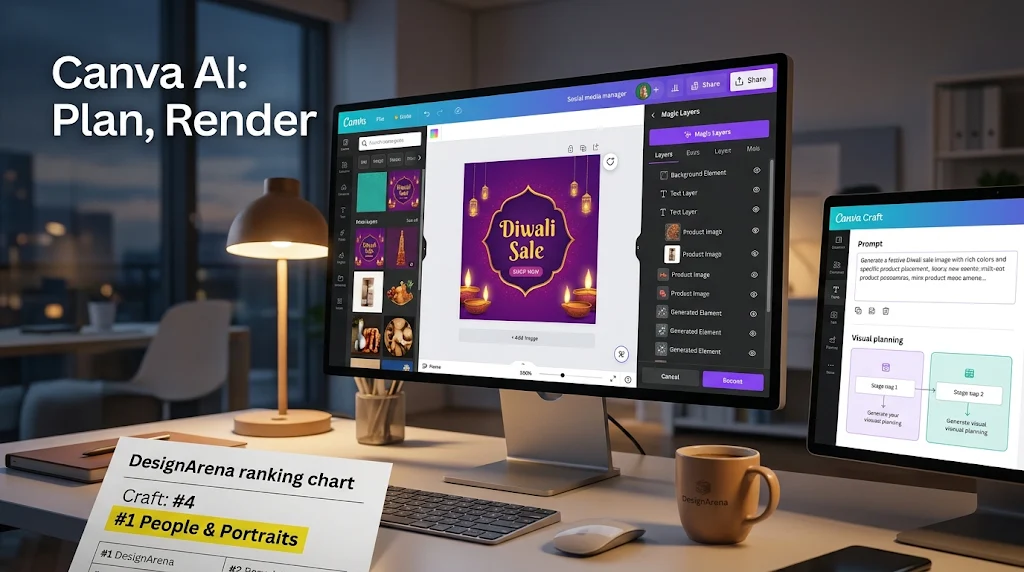
This architecture is why Craft performs well on design-heavy prompts. A Diwali sale banner arrives as layers that a shop owner can edit in Canva, changing the discount or the date without regenerating the entire image .
Magic Layers
The planning architecture enables Magic Layers, a feature that transforms generated images into fully editable design elements. Instead of a flat image, Craft outputs can be split into individual components that users can move, resize, and edit within Canva’s canvas .
This is the feature that most clearly differentiates Canva from every other AI image generator. Midjourney produces beautiful images you cannot easily edit. ChatGPT produces images you can describe changes to. Canva produces images that drop into a working design file as editable assets.
Training on Design, Not Just Photos
Craft’s training data includes millions of human-made templates from Canva’s content library: professionally designed posters, social posts, presentations, infographics, menus, and typography-rich layouts . Unlike flat photographs, these templates teach the model how layout, hierarchy, and typography fit together.
Following pre-training, Canva optimized Craft through supervised fine-tuning and reinforcement learning, incorporating feedback from Canva’s professional designers. When automated evaluations and human judgments differed, Canva sided with the designer .
How Craft Performs in Practice
DesignArena Rankings
DesignArena, the largest crowdsourced assessor of AI design, ranked Craft fourth globally in image generation as of October 2026. It placed #1 for People & Portraits (out of 87 models) and Landscapes & Nature (out of 85), #2 for Abstract & Patterns, and #4 for Products .
These rankings are notable because Craft is competing against models from OpenAI, Google, and Midjourney. It is not the best overall model. ChatGPT Images 2.5 and Nano Banana 2.1 hold the top spots . But Craft is competitive in specific categories, particularly design-adjacent tasks.
Independent Testing
Business Insider tested Craft against ChatGPT, Gemini, and Meta’s Muse on three escalating tasks . The results were mixed.
On a birthday card illustration prompt, Canva “fell short,” producing an awkward font and an outsize head. ChatGPT and Muse performed better. On an image editing task, Canva identified the element well but depicted it defying physics. On a photorealistic cat prompt, Canva’s output was comparable to Muse and Gemini, though ChatGPT won on composition and lighting .
Editorial interpretation: Craft is a design tool first and a photorealistic generator second. If your goal is a finished social graphic or a layout with text, Craft’s planning architecture is an advantage. If your goal is a standalone artistic image, dedicated models may outperform it.
Key Features and Capabilities
Magic Media Integration
Craft powers Canva’s Magic Media feature, accessible through the editor side panel. Users describe an image, choose a style (Filmic, Photo, Anime, Oil Painting, and many others), select an aspect ratio, and generate .
The output drops directly into the design canvas. From there, users can add text, apply brand colors, resize for different platforms, and export.
Brand Kit and Template Integration
Because Craft lives inside Canva, generated images can be immediately combined with brand kits, templates, and Canva’s stock library. This is the workflow advantage. A social media manager can generate a background, overlay branded text, and export a finished post without leaving the tab.
Text Rendering
Craft supports text inside images across 55 languages . This is a significant improvement over most image generators, which still garble letterforms. The planning stage is what makes it possible: the model decides where text goes before it renders.
However, independent testing suggests the text rendering is not flawless. Business Insider noted “awkward font” on the birthday card test . The capability is real but not yet perfect.
Pricing and Credit Limits
Canva’s AI image generation is bundled into its subscription tiers rather than sold separately.
| Canva Free | Up to 20 standard AI uses | Craft access via Dream Lab, limited |
| Canva Pro | Up to 200 premium AI uses or 20 Ultra AI uses | Full Craft access, Magic Layers, Brand Kit |
| Canva Business | Higher limits (20x Pro) | Team features, brand controls |
Important pricing details: The AI usage limit is shared across all AI tools, not just image generation. A complex image may consume more of the limit than a simple one. During the free trial, the AI limit is the same as Canva Free, not the paid tier .
Canva Pro costs $18/month month-to-month or $180/year (effectively $15/month). It is a one-person license; adding a second user requires Canva Business .
Credit consumption: Canva does not publish exact credit costs per image. The limit is described as “estimated” and depends on tool type, task complexity, and whether you mix tools .
Commercial Use and Copyright
Canva permits commercial use of AI-generated content within its AI Product Terms, but the terms carry important caveats .
What Canva grants: As between you and Canva, you own the AI-created content you generate. You can use it for personal and commercial purposes, provided you comply with the terms .
What Canva does not guarantee: Copyright protection. Canva states explicitly that “depending on where you live, AI-created works may not receive copyright protection.” This means you can use the image, but you may not be able to stop others from using it .
What is prohibited: Referencing known brands, characters, or people without permission. Canva recommends professional legal advice if you plan to use AI output for branding or trademark registration .
Editorial interpretation: Canva’s terms are more permissive than some competitors and more cautious than others. The ownership grant is clear. The copyright caveat is standard for AI-generated works across the industry. The prohibition on brands and celebrities is stricter than some tools but aligns with Canva’s platform policies.
Who Should Use the Canva AI Image Generator
Social media managers and marketers are the primary audience. The integration with Canva’s templates, brand kits, and export workflows makes Craft the fastest path from prompt to finished social graphic.
Small business owners already using Canva for flyers, menus, and posters can generate supporting imagery without switching tools. The free tier provides enough access to test the capability.
Designers who need editable output should use Craft’s Magic Layers. The ability to split generated images into movable components is unique to Canva’s ecosystem.
Users needing maximum photorealism or artistic quality should look to ChatGPT Images 2.5 or Midjourney. Craft is competitive but not dominant on raw image quality .
Anyone needing unrestricted content will find Canva’s moderation policies restrictive. Prompts referencing brands, celebrities, or sensitive content are blocked .
Common Mistakes and Cautions
Assuming Craft is the best model overall. It ranks fourth on DesignArena, not first. ChatGPT Images 2.5 and Nano Banana 2.1 outperform it on general image quality .
Overlooking the shared AI usage limit. Image generation consumes the same pool as Magic Write, Magic Edit, and other AI tools. Heavy use of one feature leaves less for others .
Expecting perfect text rendering. Craft supports 55 languages and plans text placement, but independent testing found awkward fonts and layout issues .
Forgetting the copyright caveat. Canva grants ownership but not copyright protection. If you need to stop others from using your image, AI-generated works may not provide that right .
Ignoring the no-brands rule. Prompts referencing known brands, characters, or people are blocked or flagged. Plan creative work accordingly .
Frequently Asked Questions
What is Canva’s AI image generator?
Canva’s AI image generator is powered by Canva Craft, the company’s first in-house image model released in October 2026. It uses a two-stage architecture that plans composition before rendering, and it integrates directly into Canva’s design canvas with editable Magic Layers .
Is Canva Craft better than Midjourney or ChatGPT?
It depends on the task. Craft ranks fourth globally on DesignArena and leads on People & Portraits and Landscapes & Nature. But ChatGPT Images 2.5 and Nano Banana 2.1 hold the top two spots overall. Craft is optimized for design layouts and editable output, not raw photorealism .
How many AI images can I generate on Canva Free?
Canva Free allows up to 20 standard AI uses across all AI tools. Canva Pro allows up to 200 premium AI uses or 20 Ultra AI uses monthly. The limit is shared across image generation, text generation, and other AI features .
Can I use Canva AI images commercially?
Yes, Canva permits commercial use within its AI Product Terms. You own the content as between you and Canva. However, Canva does not guarantee copyright protection, meaning you may not be able to stop others from using the image .
What is Magic Layers?
Magic Layers is a Canva feature that transforms AI-generated images into editable design elements. Instead of a flat image, Craft outputs can be split into individual components that users can move, resize, and edit within Canva’s canvas .
Conclusion
Craft’s planning architecture, training on templates, and Magic Layers integration all serve that goal. A social media manager can generate a background, split it into layers, overlay branded text, and export a finished post without leaving the platform. That workflow advantage is real.