Google’s Nano Banana 2 is the current leader on major independent benchmarks, ranking first on LMArena’s text-to-image leaderboard and first on Artificial Analysis at half the price of Nano Banana Pro . HiDream-O1-Image-1.5 is the top open-source alternative, ranking second globally on Artificial Analysis and first among Chinese models .
At-a-Glance: Key Takeaways
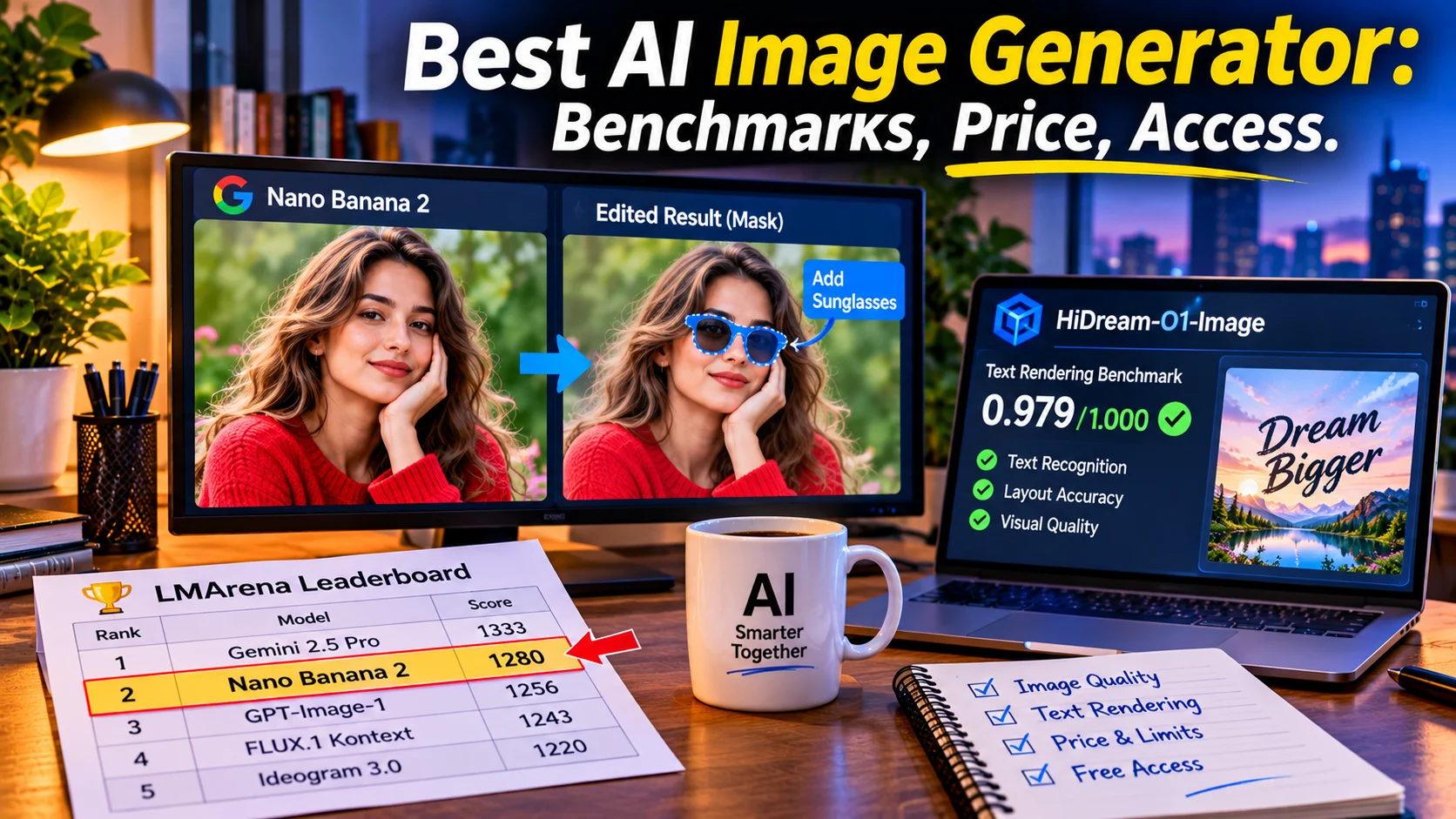
- Nano Banana 2 (Gemini 3.1 Flash Image) ranks first on LMArena with a text-to-image score of 1280, surpassing GPT Image 1.5 and Nano Banana Pro .
- It costs half as much as Pro: $0.067 per 1K image versus $0.134 on Google AI Studio .
- Nano Banana 2.1 adds mask-based local editing, scoring 1049 on mask editing, 84 points above Nano Banana 2 and 122 above Pro .
- HiDream-O1-Image-1.5 ranks second globally on Artificial Analysis with 1265 ELO, first among Chinese models .
- HiDream-O1-Image is available in open-source 8B and 200B+ Pro versions, with LongText-Bench scores of 0.979 (EN) and 0.978 (ZH) .
- Pricing, access, and commercial rights vary significantly. Google’s models are API-first. HiDream offers both open and commercial licensing.
What Makes the Best AI Image Generator?
The “best” AI image generator depends on what you need it for. A model that tops a leaderboard for photorealistic portraits may struggle with text rendering. A model that excels at editing may be slower or more expensive than a generation-only alternative.
Independent benchmarks have become more reliable than vendor claims. LMArena uses anonymous pairwise comparisons with user votes and ELO ranking, reducing brand bias . Artificial Analysis uses similar methodology. Both now place Google’s Nano Banana 2 at or near the top.
The landscape has shifted. Google’s rapid iteration cycle has produced three Nano Banana variants in under a year, each improving on price-performance. Chinese models, particularly HiDream, have closed the gap. And open-source options now offer competitive quality for local deployment.
The Top Contenders Compared
Nano Banana 2: The Current Benchmark Leader
Google’s Nano Banana 2, technically Gemini 3.1 Flash Image, represents a significant leap in price-performance. It combines the speed of a Flash-tier model with performance that surpasses the previous Pro version .
What It Does Well
The benchmark results are unambiguous. LMArena ranks it first globally for text-to-image with a score of 1280, ahead of GPT Image 1.5 and Nano Banana Pro . Artificial Analysis ranks it first for text-to-image and third for image editing.
The consistency capabilities are notable. It can maintain up to five character likenesses and up to 14 object features within a single workflow . This matters for e-commerce product shots, comic panels, and brand campaigns where visual continuity is essential.
Where It Falls Short
Nano Banana 2 is not the best at everything. On image editing benchmarks, it ranks third on Artificial Analysis, behind GPT Image 1.5 and Nano Banana Pro . The newer Nano Banana 2.1 addresses this with mask-based local editing, but it ranks fourth on Arena’s multi-image editing leaderboard, still behind OpenAI’s models .
Pricing
At $0.067 per 1K image, Nano Banana 2 costs half as much as Nano Banana Pro . Nano Banana 2.1 is even cheaper at $0.034 per 1K image . For volume workflows, this price difference compounds quickly.
Nano Banana 2.1: The Editing Specialist
Nano Banana 2.1 is a targeted update focused on editing precision. The headline feature is mask-based local editing: you circle a region, describe the change, and only that region changes .
What It Does Well
The mask editing score of 1049 is 84 points above Nano Banana 2 and 122 above Pro . Practical tests show it can change a banknote’s serial number, add a banana to a philosopher’s hand, and add text banners without altering the surrounding maze, robe, or beard.
Multi-character consistency improved significantly. The score of 1106 is 128 points above Nano Banana 2. Developers can supply up to 10 object reference images and 4 character reference images for a single generation .
Where It Falls Short
Nano Banana 2.1 still lags behind OpenAI’s GPT Image models on Arena’s multi-image editing leaderboard, where it ranks fourth . It also has acknowledged weaknesses in small text rendering, 3D reasoning, and factual accuracy.
HiDream-O1-Image: The Open-Source Challenger
HiDream, a Hefei-based AI company, has produced the strongest Chinese image model and a credible open-source alternative to Google’s closed systems .
What It Does Well
HiDream-O1-Image-1.5 ranks second globally on Artificial Analysis with a 1265 ELO, behind only OpenAI . The open-source HiDream-O1-Image-Dev-2604 ranked first among open-source models globally before that.
Text rendering is a standout. HiDream-O1-Image scores 0.979 on LongText-Bench for English and 0.978 for Chinese . The 200B+ Pro version scores 0.982 and 0.980 respectively. This makes it one of the few models that can reliably render legible text in both languages.
The architecture is notable. HiDream-O1 uses a native unified Transformer (UiT) that maps pixels, text tokens, video, audio, and spatial relationships into a shared token space, rather than stitching modalities together after training . This architectural choice underpins its consistency and text capabilities.
Where It Falls Short
The 8B open-source version is competitive with FLUX.2 and Qwen-Image but does not match the closed 200B+ Pro version . Local deployment requires capable hardware. The commercial licensing terms for the closed version are not published, requiring direct engagement with HiDream.
Where the Paywall Actually Lands
Image generation pricing has become aggressive. Google’s half-price strategy for Nano Banana 2 and quarter-price strategy for 2.1 signals a price war .
API pricing favors volume. At $0.034 to $0.067 per image, Google’s models are accessible for experimentation. HiDream’s commercial pricing is not public, but open-source weights eliminate per-image costs for self-hosted deployments .
Feature gating matters more than price. Mask editing, multi-reference consistency, and 4K output are available on Nano Banana 2.1. Earlier models cannot match these capabilities regardless of price.
Open-source eliminates recurring costs but requires hardware. The 8B HiDream model can run locally. The trade-off is GPU infrastructure and setup complexity.
Who Should Use Which Generator
Marketers and social media creators should use Nano Banana 2 for general generation. It leads benchmarks, costs little, and handles consistency across multiple images.
Designers needing precise edits should use Nano Banana 2.1 for mask-based local editing. The ability to change one region without affecting others is a workflow accelerator.
Developers and researchers should explore HiDream-O1-Image for open-source deployment. The MIT-style license and strong text rendering make it suitable for integration and local processing.
E-commerce teams should evaluate Nano Banana 2.1’s multi-reference consistency for product photography. Up to 14 object references and 4 character references support complex scenes.
Chinese-language content creators should consider HiDream for its LongText-Bench-ZH score of 0.978, which indicates reliable Chinese text rendering .
Common Mistakes and Cautions
Assuming the leaderboard winner is best for your task. Nano Banana 2 leads text-to-image but ranks third on image editing . The best model depends on the workflow.
Ignoring the difference between Nano Banana 2 and 2.1. The 2.1 update adds mask editing and improves consistency, at a lower price . For editing-heavy work, 2.1 is the better choice.
Overlooking open-source options. HiDream-O1-Image offers competitive quality with local deployment . Cloud APIs are not the only path.
Expecting perfect text rendering from every model. Only HiDream and Ideogram have demonstrated reliable text rendering. Most models still produce garbled letterforms.
Forgetting that benchmarks use curated prompts. Leaderboard scores reflect performance on standardized tests. Real-world prompts may produce different results.
Frequently Asked Questions
What is the best AI image generator overall?
Google’s Nano Banana 2 is the current benchmark leader, ranking first on LMArena for text-to-image with a score of 1280 and first on Artificial Analysis, at half the price of Nano Banana Pro .
Is Nano Banana 2 better than Pro?
For text-to-image, yes. Nano Banana 2 ranks higher than Pro on major benchmarks and costs half as much . For image editing, Pro still leads on some measures, though Nano Banana 2.1 closes the gap with mask editing .
What is the best open-source AI image generator?
HiDream-O1-Image is the strongest open-source option, with an 8B version that scores 0.979 on LongText-Bench for English and 0.978 for Chinese . The commercial 1.5 version ranks second globally on Artificial Analysis .
Can I use these AI image generators for commercial work?
It depends on the licensing. Google’s API terms govern Nano Banana usage. HiDream’s open-source model has a permissive license, but commercial terms for the closed Pro version require direct engagement. Always verify current terms before client work.
What is mask-based editing?
Mask-based editing lets you circle a specific region of an image and describe a change, with the model only modifying that region while preserving the rest. Nano Banana 2.1 supports this with a score of 1049 on mask editing benchmarks .
Conclusion
The best AI image generator in 2026 is Google’s Nano Banana 2 for general generation, Nano Banana 2.1 for precise editing, and HiDream-O1-Image for open-source deployment. The benchmarks support these conclusions, but the choice depends on your workflow.