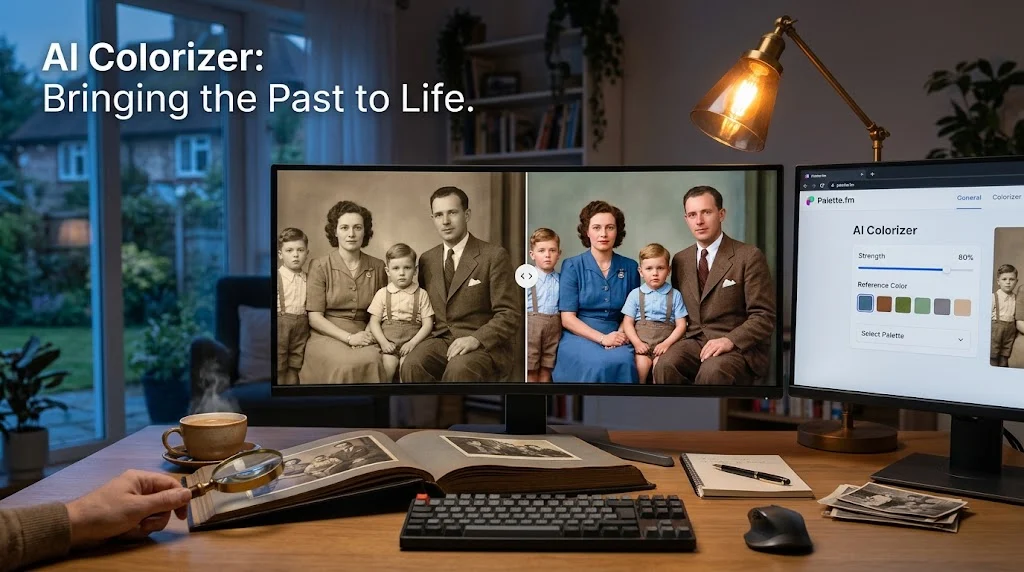
An AI colorizer is a tool that uses deep neural networks to predict and apply realistic colors to grayscale or black-and-white photographs. Options range from free browser tools like Palette.fm to professional-grade Photoshop neural filters, with API-based services costing as little as $0.04 to $0.05 per image.
At-a-Glance: Key Takeaways
- AI colorization uses deep neural networks trained on millions of grayscale-color image pairs to predict plausible colors for unseen photos .
- Free options are genuinely capable. Palette.fm, Google Photos Recolor, and Samsung Galaxy AI offer no-cost colorization for casual users .
- **Paid tools range from $1.50/month** for basic mobile apps to $22.99/month for Adobe Photoshop’s professional-grade neural filters .
- Accuracy is probabilistic, not certain. AI predicts colors based on statistical patterns, meaning it can get skin tones, clothing, and objects wrong .
- Privacy varies dramatically. Some tools process everything on-device, while others upload photos to vendor servers .
- Common artifacts include color bleeding, spatial inconsistency, and over-saturation, especially on complex scenes or small faces .
What Is an AI Colorizer?
An AI colorizer is a software tool that transforms black-and-white or grayscale images into full-color versions using artificial intelligence. The technology relies on deep neural networks (DNNs), particularly convolutional neural networks (CNNs) and generative adversarial networks (GANs), trained on massive datasets of paired grayscale and color images .
The core challenge is that colorization is inherently ambiguous. A grayscale pixel value of 128 could represent a blue sky, a red brick, or a gray shirt. The AI must infer the most likely color based on context, semantics, and patterns learned from training data .
Unlike manual colorization, which requires an artist to research historical accuracy and paint each region by hand, AI colorization is fast, scalable, and accessible to anyone. The trade-off is that the results are predictions, not facts. The AI does not know what color someone’s dress actually was; it guesses based on what similar dresses usually look like .
How AI Colorizers Work
The Neural Network Pipeline
Modern AI colorization typically operates in the CIELAB color space, separating lightness (L) from color channels (a and b). The model receives the grayscale L channel and predicts the missing a and b channels . This approach allows the network to focus on color prediction rather than brightness.
Training involves showing the network millions of grayscale-color image pairs. The network learns statistical associations: sky is usually blue, grass is usually green, skin tones fall within a certain range. Over time, it develops the ability to generate plausible colors for images it has never seen .
Automated vs. Interactive Approaches
Fully automatic colorization requires no user input. The AI generates the entire color output on its own. This is convenient but prone to spatial inconsistency and color bleeding, where colors spill across object boundaries .
Interactive or point-based colorization lets users place color hints at specific locations. The AI then propagates those hints throughout the image. This gives users more control but depends heavily on the quality of the hints provided .
Professional tools like Adobe Photoshop’s Colorize neural filter offer extensive manual control, including masks, brushes, and multiple adjustment layers. This is the highest-effort, highest-accuracy approach .
The Role of Transformers
Recent research has introduced transformer-based architectures to colorization. ColorGPT, for example, uses a large language model to generate context-aware color descriptions, then ranks them with CLIP before applying the selected colors via a transformer-based module. This approach improved PSNR (peak signal-to-noise ratio) by 0.7 to 1.2 dB over prior methods .
Major AI Colorizer Tools Compared
Key Features and Capabilities
Free Browser Tools
Palette.fm runs in a browser at no charge and handles clean studio scans well. It offers a strength slider and reference color options. However, it struggles with faces smaller than roughly 60 pixels .
Google Photos Recolor is included with a Google account on supported devices, making it the most accessible option for Android users. Samsung bundles colorization into Galaxy AI on eligible phones .
Mobile Apps
Colorize Images offers a free tier with ad-supported colorization, an 8-hour unlimited pass for $0.50, and monthly unlimited access for $1.50. The app is designed for casual users who want quick results without commitment .
Colorrr is a free Android app that colorizes photos without watermarks. User reviews are mixed: some praise it for bringing old photos to life, while others report that colors are often inaccurate, especially for non-portrait subjects .
Professional Tools
Adobe Photoshop’s Colorize neural filter remains the most controllable option available. It allows users to adjust strength, add color hints, and refine results with masks and brushes. The Photography plan lists around $9.99 per month, with full Photoshop around $22.99 per month .
API-Based Services
WaveSpeedAI offers AI Photo Colorizer at $0.05 per image via REST API, with no subscription or minimum commitment. Colorizing 100 images costs $5 . Bria Fibo Colorize is available at $0.04 per image through WaveSpeedAI, also with pay-per-use pricing .
Privacy-First Options
DeOldify is free and open source, running locally with no upload required. It supports video colorization and offers model and command-line options for technical users .
ReColor processes everything on-device using an on-device AI model. Original and colorized photos are never uploaded to or stored on servers. The app is available on iOS .
Pricing and Plans
AI colorizer pricing spans from free to professional subscriptions.
Important pricing context: Free tiers often trade speed, export size, or privacy for cost. Paid plans typically run from about $3 to $23 per month on US list pricing .
Privacy and Security Considerations
Privacy practices vary dramatically across AI colorizer tools. The choice of tool determines whether your photos leave your device.
On-Device Processing
ReColor processes everything on-device. Its Terms of Use state: “Your original and colorized photos are never uploaded to or stored on our servers.” Users retain full ownership of their images .
DeOldify runs locally, removing the upload question entirely. For irreplaceable family photos, a local tool eliminates privacy concerns .
Cloud Processing
Most browser-based tools upload images to vendor servers for processing. Palette.fm, Google Photos Recolor, and MyHeritage In Color all process in the cloud. Google Photos stores colorized images in the user’s Google Photos library .
Pixelift’s privacy policy states that uploaded images are processed using third-party AI services (Replicate.com) and automatically deleted after processing. Processed images are temporarily stored for download and deleted within 24 hours .
What to Look For
Before uploading irreplaceable photos to any AI colorizer, review the privacy policy for:
- Where images are processed (on-device vs. cloud)
- How long images are retained
- Whether images are used for training
- Whether the vendor shares data with third parties
Important distinction: SOC 2 certification or similar compliance frameworks are not referenced for most AI colorizer tools. For sensitive or irreplaceable photos, on-device or local options provide the strongest privacy guarantee.
Common Limitations and Artifacts
AI colorization is not perfect. Understanding the common failure modes helps set realistic expectations.
Spatial Inconsistency
Colors may appear blotchy or fragmented even within structurally continuous regions. This occurs because fully automatic models approximate the overall distribution of colors rather than ensuring spatial coherence .
Color Bleeding
Colors may spill over object boundaries, leading to indistinct edges and unnatural appearances. This is particularly problematic when a subject’s clothing color bleeds into their skin or background .
Over-Saturation and Inaccuracy
User reviews consistently report over-saturated colors, especially on lips and skin tones. One PhotosRevive reviewer noted “large red marks like terrible colds under all the lady’s noses” on an 1860s photograph . Another reported that a fire chief pedal car that was originally bright cherry red was rendered blue .
Small Face Limitations
Free browser tools struggle with faces smaller than roughly 60 pixels. For group photos or distant subjects, results may be poor .
The Accuracy Paradox
The fundamental limitation is that AI predicts colors based on statistical likelihood, not ground truth. If you do not know what the original colors were, you cannot verify whether the AI got them right. As one reviewer noted: “If you don’t know what the colors were originally you won’t know if the app is right” .
Who Should Use AI Colorizers
Casual users wanting to see old family photos in color. Free tools like Palette.fm and Google Photos Recolor offer immediate, no-cost results .
Family historians and genealogists restoring archival photographs. MyHeritage In Color integrates with family tree research and offers a free tier for occasional use .
Professionals and print archivists needing maximum control. Adobe Photoshop’s Colorize neural filter offers the highest manual control for print-quality output .
Developers and API consumers integrating colorization into applications. WaveSpeedAI and Bria Fibo offer simple REST APIs at $0.04-$0.05 per image .
Privacy-conscious users handling sensitive or irreplaceable photos. DeOldify (local) and ReColor (on-device) avoid uploading images to external servers .
Users expecting perfect accuracy should understand that AI colorization is probabilistic. Results may be plausible but not historically correct.
Common Mistakes and Cautions
Assuming color accuracy. AI predicts colors; it does not know them. Skin tones, clothing, and objects may be rendered in colors that look plausible but are wrong .
Uploading irreplaceable photos without checking privacy. Most free browser tools upload images to vendor servers. For irreplaceable originals, use on-device or local tools .
Ignoring the need for post-processing. Most AI colorizers benefit from manual correction. Colors may be over-saturated, under-saturated, or bleed across boundaries .
Expecting good results on complex scenes. Free tools handle clean studio scans well but struggle with group photos, small faces, and complex scenes with many objects .
Forgetting that “free” may mean watermarked. Some free mobile apps add watermarks to colorized output. Colorrr explicitly offers watermark-free results, but not all apps do .
Frequently Asked Questions
What is an AI colorizer?
An AI colorizer is a tool that uses deep neural networks to predict and apply colors to grayscale or black-and-white images. It is trained on millions of image pairs to learn statistical associations between lightness and color .
Are AI colorizers accurate?
AI colorization is probabilistic, not certain. The AI predicts the most likely colors based on training data. Results may look plausible but can be historically incorrect, especially for specific clothing, objects, or skin tones .
What is the best free AI colorizer?
Palette.fm is the best free browser option for quick jobs. Google Photos Recolor is free with a Google account and works well for Android users. Samsung Galaxy AI offers built-in colorization on eligible phones .
Does AI colorization work on old damaged photos?
AI colorization works best on clean scans. Old, damaged, or degraded photos may produce poor results. Some tools, like MyHeritage In Color, are designed specifically for family archives but still benefit from clean source images .
Can I colorize photos without uploading them?
Yes. DeOldify runs locally and is free and open source. ReColor processes everything on-device using an on-device AI model. Both options eliminate the need to upload photos to external servers .
Conclusion
AI colorizers have made photo colorization accessible to anyone with a browser or smartphone. Free tools like Palette.fm and Google Photos Recolor deliver immediate results. Professional tools like Adobe Photoshop offer granular control. API services enable integration into custom workflows at pennies per image.
What matters most is understanding what these tools actually do. They predict colors based on statistical patterns, not historical fact. The output may look convincing but can be wrong. For casual viewing, that is often fine. For archival or historical purposes, human verification remains essential.
AI colorizers may suit casual users exploring family photos, genealogists restoring archives, professionals needing print-quality control, and developers building colorization into applications. They may not suit users expecting guaranteed accuracy or those unwilling to accept probabilistic results.
Inclusive language
Before uploading irreplaceable photos to any AI colorizer, review the privacy policy. Consider whether an on-device or local option better protects your originals. And remember that the “best” tool depends on your priorities: free and fast, controlled and professional, or private and local. The technology has matured to the point where anyone can see their old photos in color. The responsibility for using it wisely remains with the user.